





What search engines need from your website, explained without jargon, and how to spot when something is broken.
Your website looks fine to you. It might look very different to a search engine, and the search engine is the one deciding whether anyone finds you.
Technical SEO basics are the handful of things that decide whether search engines can reach your pages, understand them and show them to people. Unlike content or links, this is plumbing: invisible when it works, expensive when it does not. You do not need to become a developer, but you do need to recognise the symptoms, which is the part most owners miss when they hire an agency to handle what does an SEO company do on their behalf.
This guide explains each concept in plain language, shows the signs that something has gone wrong, and ends with a health check you can run yourself in half an hour.
The short answer: search engines must be able to crawl your pages, index them, load them quickly on a phone, and understand what they are about. Technical SEO is making sure all four happen reliably.
Key Takeaways
- Technical SEO makes sure search engines can find, read, load and understand your website.
- Crawling, indexing and ranking are three separate steps, and a site can fail at any one of them.
- Website crawlability problems usually come from blocked pages, broken links or pages nothing links to.
- Indexing problems are often self-inflicted, such as a page accidentally marked as not for indexing.
- Good site architecture means every important page is reachable within about three clicks.
- An XML sitemap lists the pages you want found, while a robots file tells crawlers where not to go.
- Core Web Vitals measure loading, responsiveness and visual stability, all of which affect real users.
- Most technical faults are invisible to you and obvious in free tools, so check rather than assume.
What Is Technical SEO, and How Is It Different?
Technical SEO is the work that makes a website easy for search engines to crawl, index, render and understand. It covers crawlability, indexing, site architecture, page speed, mobile usability, security and structured data, rather than the words on your pages or the links pointing at them.
The three parts of search optimization divide neatly. On-page SEO is what your pages say. Off-page SEO is what other websites say about you. Technical SEO is whether search engines can access and interpret any of it in the first place. The order matters, because excellent content on an unreachable page earns nothing.
There is a useful way to think about this. Content and links are how you compete. Technical SEO is how you qualify to compete at all.
Key Takeaway: Technical SEO rarely wins you rankings on its own. It routinely loses them when ignored.
How Search Engines Discover, Crawl and Index Your Site
Search engines follow three steps before a page can rank. They discover a page exists, crawl it by downloading and reading the content, then index it by storing it as eligible to appear in results. Ranking happens afterwards, and only for pages that cleared all three.
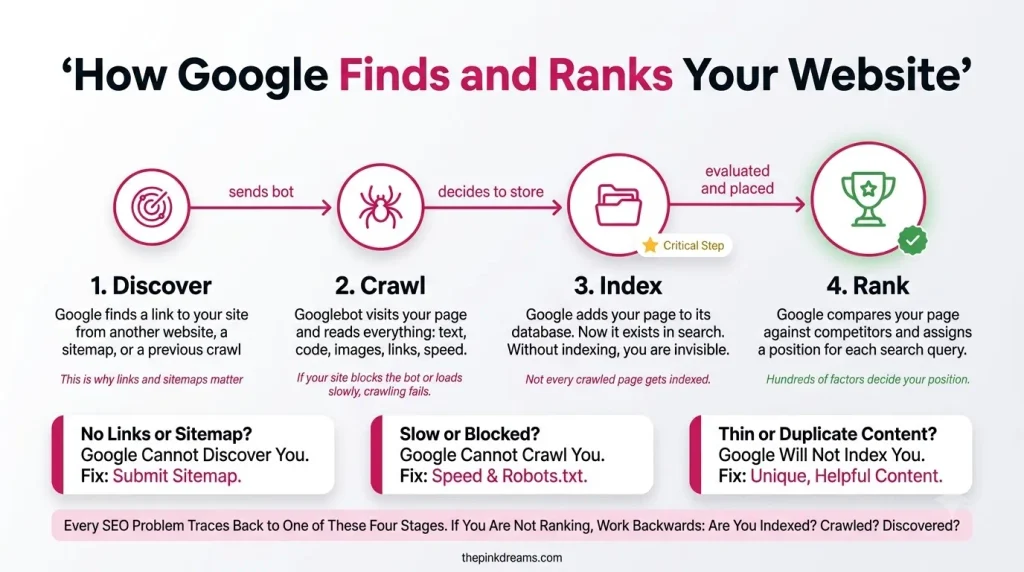
Discovery happens when a search engine finds a link to your page, either from another site, from elsewhere on your own site, or from your XML sitemap. A page nothing links to and no sitemap mentions may simply never be found.
Crawling is the download. An automated crawler requests the page, reads the code, follows the links it contains and notes anything that blocks it. Crawlers have limited patience for slow or error-filled sites, which matters more as a site grows.
Indexing is the decision to store the page as a candidate for search results. A page can be crawled and still not indexed, usually because it duplicates another page, carries an instruction not to index it, or offers too little for a search engine to consider worth storing.
Understanding this sequence is the single most useful thing in this article, because it tells you where to look when a page is missing from search. Not found means a discovery problem. Found but not indexed means an indexing problem. Indexed but invisible is a content and competition problem.
Key Takeaway: Discovered, crawled, indexed, ranked. Find the step where your page stops, and you have found the fault.
The Technical SEO Basics Every Business Website Needs
Seven fundamentals cover almost everything a small business site needs: crawlability, indexing, site architecture, your sitemap and robots file, Core Web Vitals, mobile usability with HTTPS, and structured data. Each one below includes the symptoms you would actually notice.
1. Website Crawlability: Can Search Engines Reach Your Pages?
In plain English: Crawlability is whether a search engine can actually get to a page and read it.
Crawlers move through your site by following links. If a page has no links pointing to it from anywhere, it becomes what the industry calls an orphan page, visible to anyone with the address and invisible to everyone else.
Other common blockers are accidental instructions in your robots file, pages that require a login, navigation that only works with scripts the crawler cannot run, and chains of redirects that give up before reaching the destination. Broken internal links waste crawler attention on dead ends, which matters because no site gets unlimited crawling.
Signs something is wrong:
• Pages you know exist never appear in search results
• Your main navigation only works when scripts load
• Visitors occasionally report page not found errors
• You have moved or renamed pages without redirecting the old addresses
2. Indexing: Are Your Pages Eligible to Appear in Search?
In plain English: Indexing is whether a crawled page has been stored as a candidate to show in results.
The most common indexing problem in small business websites is self-inflicted. A page carries a hidden instruction telling search engines not to index it, usually left over from when the site was being built, and nobody notices for months.
The other frequent cause is duplication. When several addresses show essentially the same content, search engines must choose one to treat as the original. A canonical tag is how you tell them which version you prefer. Without that guidance, they will decide for themselves, and sometimes choose the wrong one.
Signs something is wrong:
• A page you published weeks ago still does not appear when you search its exact title
• The same content is reachable at several different addresses
• Your site appears with an address you did not expect, such as one with unusual characters after it
• Product or service pages with very little unique text are missing from results
3. Site Architecture: How Your Pages Should Be Organised
In plain English: Site architecture is how your pages are grouped and linked, and how easily anyone can reach them.
A sound structure is shallow and logical: home page, then main service or category pages, then detail pages beneath them. Every page that matters commercially should be reachable in roughly three clicks from the home page, because depth makes pages harder to find for both crawlers and customers.
Internal linking is the practical expression of architecture. Links between related pages show search engines which pages are important and how they relate to each other. Clear, readable addresses help too, since a short descriptive address is easier to understand than a string of numbers.
Architecture also affects conversion, because a visitor who cannot find your service page cannot enquire. Our guide on how to build a lead generation website covers that side.
Signs something is wrong:
• Important pages are buried four or five clicks deep
• Your navigation has grown organically and nobody can explain the logic
• Similar services are scattered across unrelated sections
• Page addresses contain long strings of numbers or dates that mean nothing to a reader
4. Your XML Sitemap and Robots File
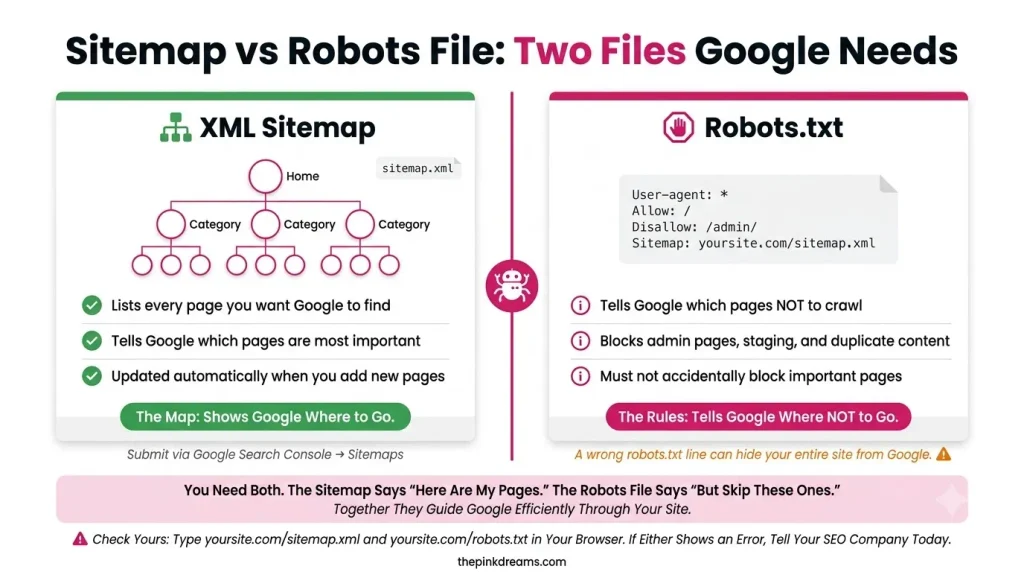
In plain English: An XML sitemap lists the pages you want search engines to find. A robots file tells crawlers which areas to avoid.
The XML sitemap is a machine-readable list of your important addresses, usually generated automatically and submitted through a search engine’s webmaster tools. It does not guarantee indexing, but it does help discovery, particularly for newer pages and larger sites.
The robots file sits at the root of your domain and gives crawling instructions. It is powerful and unforgiving: a single stray line can block an entire website. If anyone has touched it, it is worth checking, because this is one of the few technical faults that can remove a site from search almost completely.
Keep the sitemap clean. It should list the pages you actually want found, not every address your site can generate, and certainly not pages that redirect or no longer exist.
Signs something is wrong:
• You have never submitted a sitemap to any search engine
• Your sitemap contains hundreds of addresses you do not recognise
• Traffic dropped sharply and permanently after a website change
• Search results show far fewer pages than your site contains
5. Core Web Vitals and Page Speed
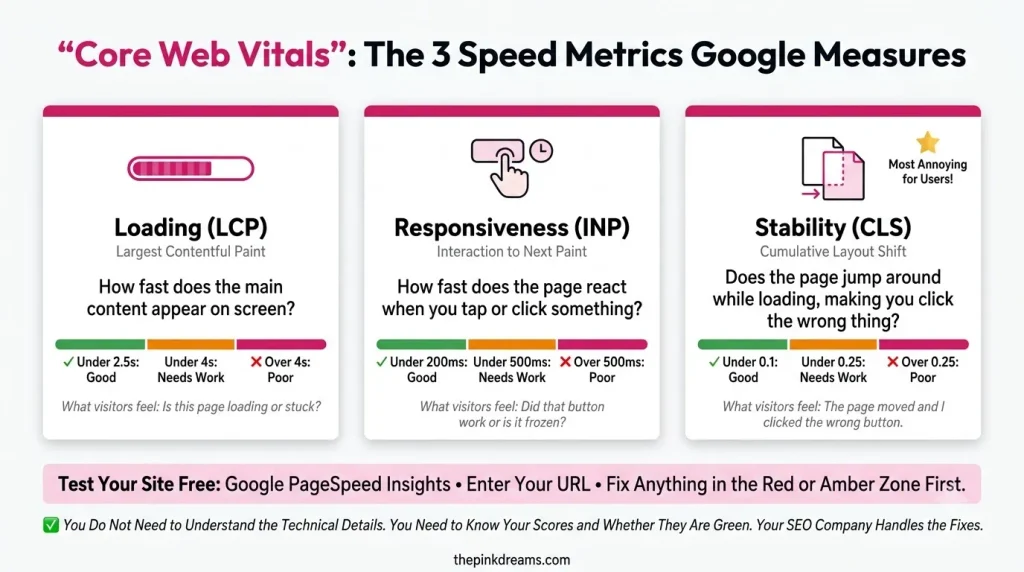
In plain English: Core Web Vitals are three measurements of how your pages feel to a real visitor: how fast the main content loads, how quickly the page responds to a tap, and how much it jumps about while loading.
The three measures are Largest Contentful Paint, which tracks when the main content appears, Interaction to Next Paint, which tracks responsiveness to taps and clicks, and Cumulative Layout Shift, which tracks unexpected movement of the page while it loads.
Google publishes target thresholds for each, and its current guidance treats loading under 2.5 seconds, responsiveness under 200 milliseconds and a layout shift score under 0.1 as good. These thresholds are periodically revised, so check the current figures rather than relying on a number in an article.
For most small business sites the causes of poor scores are mundane: oversized images, too many third-party scripts, chat widgets and tracking tags loading before the content, and fonts that arrive late. Speed matters beyond ranking anyway, because a visitor waiting for your page is a visitor considering a competitor.
Signs something is wrong:
• Your site feels slow on mobile data, away from office wifi
• Buttons appear to do nothing for a second after being tapped
• Content jumps down the page as images and adverts load
• You have added several tracking and chat tools over the years and removed none
6. Mobile Usability and HTTPS
In plain English: Mobile usability is whether your site works properly on a phone. HTTPS is the secure connection that keeps data between your visitor and your site private.
Most people searching for a local service are on a phone, and search engines predominantly assess the mobile version of a site. A site that works beautifully on a desktop and awkwardly on a phone is, for ranking purposes, an awkward site.
HTTPS is now a baseline expectation rather than an advantage. Browsers warn visitors away from pages without it, which matters enormously on any page asking for contact details. Make sure every page uses it and that insecure addresses redirect to the secure version.
Signs something is wrong:
• Text requires pinching to read, or buttons sit too close together on a phone
• Forms are difficult to complete on a small screen
• A browser shows a not secure warning on any of your pages
• Both secure and insecure versions of your site load without redirecting
7. Structured Data: Helping Search Engines Understand Your Pages
In plain English: Structured data is extra code that labels information on a page, such as your address, opening hours, services or reviews.
Search engines read your visible content, but structured data removes the guesswork by labelling it explicitly. This can make your listing eligible for enhanced results such as review stars, frequently asked questions or business details, though eligibility never guarantees display.
For small businesses the most valuable types are local business details, services, frequently asked questions and reviews. It also helps answer engines and AI assistants, which rely heavily on clearly labelled information when deciding what to summarise and cite.
Signs something is wrong:
• Competitors show review stars or question links in results and you do not
• Your opening hours or address appear incorrectly in search
• You added structured data once and have never tested whether it validates
Common Technical SEO Problems on Small Business Websites
Most technical faults on small business sites fall into a short list, and almost all of them arrive the same way: a change was made and nobody checked the consequences. Redesigns, new booking tools and well-meaning tidying are the usual culprits.
• Pages blocked during a redesign and never unblocked when the site went live.
• Old addresses are not redirected after a rebuild, so links and rankings point at dead pages.
• Duplicate versions of the site loading at both the secure and insecure address.
• Oversized images uploaded straight from a camera or phone.
• Script overload from chat tools, trackers and widgets added over several years.
• Thin or empty pages created automatically that add nothing and dilute the site.
• Broken internal links after pages were renamed or deleted.
• No sitemap submitted, so new pages wait longer to be discovered.
Key Takeaway: Most technical faults begin with a website change nobody tested afterwards.
A 30-Minute Technical SEO Health Check You Can Run Yourself
You can diagnose most common faults in half an hour using free tools and no technical knowledge. None of the steps below require code, and all of them tell you whether to relax or to call someone.
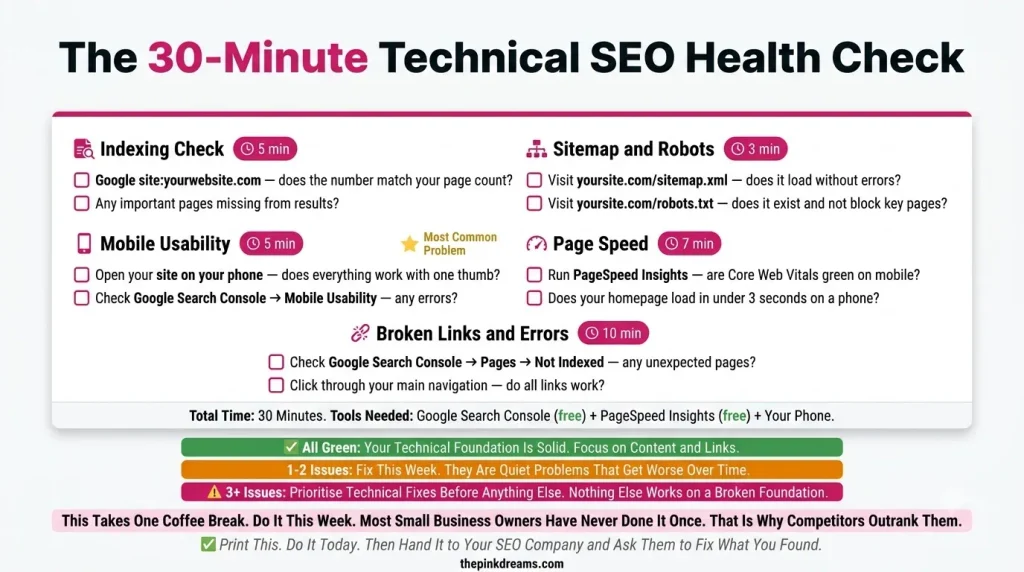
1. Search for your own site using the site colon operator followed by your domain. Roughly the right number of pages should appear. Far fewer suggests an indexing problem, far more suggests duplication.
2. Open your robots file by adding /robots.txt to your domain. If you see a line disallowing everything, stop and get help immediately.
3. Check your sitemap by adding /sitemap.xml to your domain, or find it through your search console account. Confirm it exists and contains pages you recognise.
4. Set up a free search console account with Google and Bing if you have not already. Both report indexing problems, crawl errors and mobile issues directly.
5. Run your three most important pages through a free page speed tool and note the Core Web Vitals results.
6. Open your site on your own phone using mobile data rather than wifi, and try to complete your own enquiry form.
7. Click through your main navigation and count how many clicks it takes to reach your most profitable service page.
8. Test one page in a structured data validation tool to see whether your markup is recognised.
Write down what you find. Half the value of this exercise is having specifics to hand when you speak to a developer or agency, rather than a vague sense that something is wrong. A broader lead generation audit follows the same principle across your whole funnel.
Key Takeaway: Thirty minutes with free tools will surface most faults that cost a small business visibility.
What You Can Fix Yourself and What Needs a Developer
Some technical SEO work is genuinely a matter of tidying, and some risks taking your site offline. Knowing the difference saves money and prevents the kind of accident that takes a week to undo.
Usually safe to handle yourself: compressing images before uploading them, writing clear page titles and descriptions, adding internal links between related pages, removing chat or tracking tools you no longer use, fixing obviously broken links, and claiming and verifying your search console accounts.
Worth leaving to a specialist: editing the robots file, setting up redirects after a rebuild, changing canonical tags, implementing structured data, diagnosing crawl errors at scale, and anything involving your server, hosting configuration or site templates.
The dividing line is simple. If a mistake would only affect one page, it is usually safe to try. If a mistake could affect every page at once, it is worth paying someone. Our guide on SEO deliverables covers what to expect when that work is handled by an agency.
Key Takeaway: One page at risk, do it yourself. The whole site is at risk, hire someone.
When Technical SEO Becomes an Ongoing Job
Technical SEO is not a one-off project, because websites change constantly. Every new page, plugin, integration or redesign is a chance for something to break quietly. For a small, stable site, a quarterly check is usually enough.
Certain moments deserve an immediate review rather than a scheduled one. A website rebuild or redesign is the highest-risk event in technical SEO, and most catastrophic traffic losses trace back to one. Moving to a new domain, restructuring your navigation, adding a booking or payment system, or noticing a sudden drop in search traffic all warrant checking straight away.
If your site is large, changes frequently, or search is a major source of enquiries, continuous monitoring becomes worthwhile. That is usually the point at which a lead generation SEO company earns its fee, because the cost of a fault going unnoticed for a quarter exceeds the cost of someone watching for it.
Key Takeaway: Check quarterly, and always immediately after a redesign. That one habit prevents most disasters.
Technical SEO Basics: Getting Your Website Foundations Right
Technical SEO basics come down to a simple proposition: make it easy for search engines to reach your pages, understand them and serve them quickly to people on phones. Nothing in this article requires you to write code, and all of it is checkable with free tools and an afternoon.
If you do only one thing this week, set up a search console account and read what it tells you. It will report pages that could not be indexed, mobile problems and crawl errors directly, in language that is clearer than most of the industry manages. For many small businesses, that single step surfaces a fault that has been quietly limiting visibility for a year.
Then fix the foundations before investing in anything else. Content and links both work far better on a site that loads quickly, organises its pages sensibly and lets search engines in. Getting the plumbing right is unglamorous, and it is the reason some businesses see results from search while competitors with similar budgets do not.
If you would rather have specialists diagnose and fix this for you, Pinkdreams can help. Pinkdreams is a digital marketing agency that helps businesses attract more customers through search, paid media, content and conversion-focused strategy. Our team reviews your current visibility and pipeline, builds a customised roadmap, and handles the work needed to turn enquiries into clients. Request a free digital presence audit to see where you stand.
FAQ
What are technical SEO basics?
Technical SEO basics are the fundamentals that let search engines find, read and understand your website: crawlability, indexing, site architecture, your XML sitemap and robots file, Core Web Vitals and page speed, mobile usability, HTTPS security and structured data. They determine whether your content is eligible to rank at all.
What is the difference between crawling and indexing?
Crawling is when a search engine downloads and reads a page. Indexing is when it stores that page as eligible to appear in search results. A page can be crawled and still not indexed, usually because it duplicates another page, carries an instruction not to index it, or offers very little unique content.
What are Core Web Vitals in simple terms?
Core Web Vitals are three measurements of how a page feels to a real visitor: how quickly the main content loads, how fast the page responds to a tap or click, and how much the layout shifts while loading. Google publishes target thresholds for each, and those thresholds are revised periodically.
Do I need an XML sitemap for a small website?
It is worth having, even for small sites. An XML sitemap lists the pages you want search engines to find and helps them discover new or recently changed pages faster. It does not guarantee indexing, and it does not replace good internal linking, but it costs nothing and removes one obstacle.
Can I do technical SEO myself?
Partly. Compressing images, writing clear titles, adding internal links, removing unused scripts and setting up search console accounts are all safe to handle yourself. Editing robots files, setting up redirects, changing canonical tags and server configuration are better left to a specialist, because mistakes there can affect every page at once.

Digital Marketing Strategist & Business Coach
As a leading digital marketing strategist and business coach, he is responsible for helping entrepreneurs and brands grow faster in a smarter, more scalable way. With over 20 years of experience, Nagarajan specializes in practical coaching, automation-first marketing strategies, and technology-driven growth systems. His work focuses on enhancing brand visibility, improving performance, and building sustainable frameworks that enable long-term business success.