




What to buy, in what order, to stop losing the leads your marketing already worked hard to win.
Winning a lead costs money. Losing one costs the same money, plus the sale.
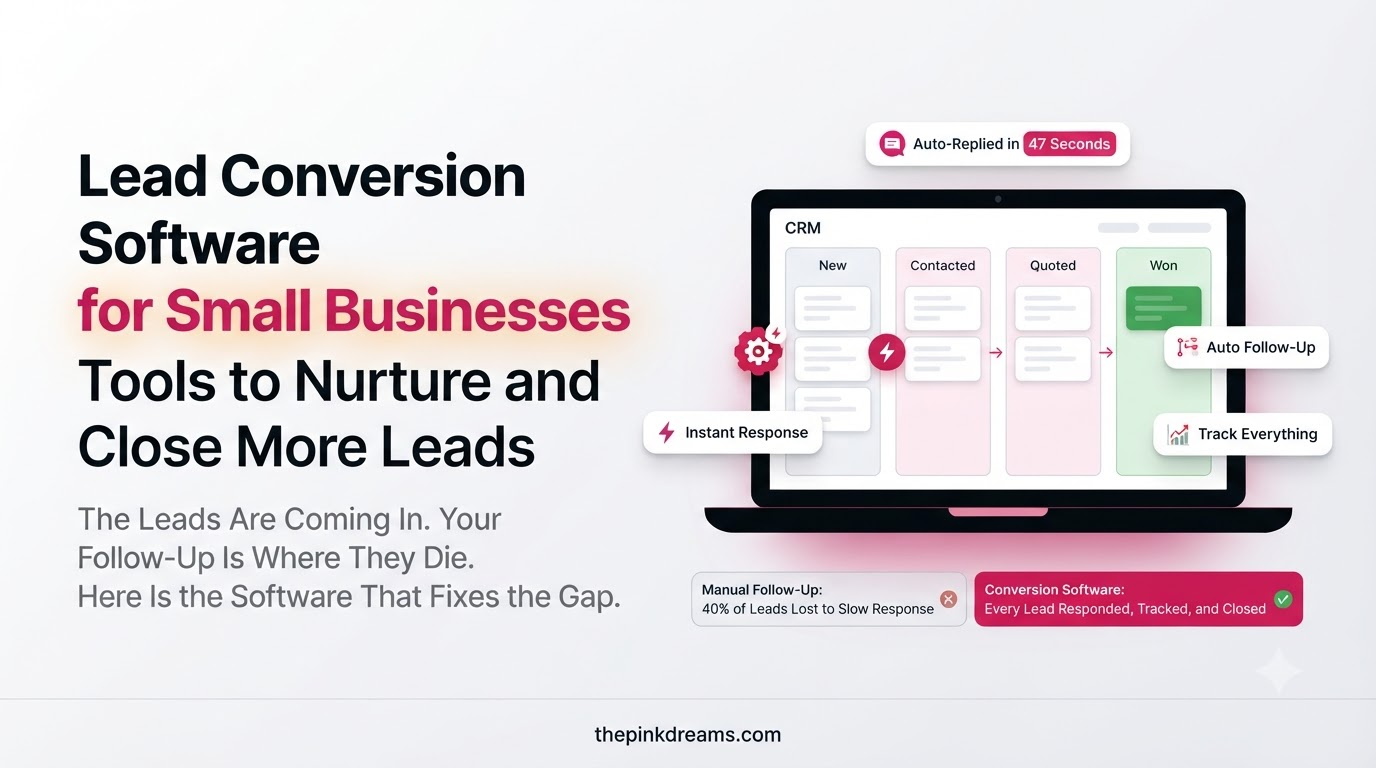
Most small businesses spend heavily on being found and almost nothing on what happens next, which is why enquiries sit unanswered in inboxes while the marketing budget keeps running. Lead conversion software closes that gap by recording every enquiry, prompting the follow-up, and keeping in touch with people who are interested but not ready yet. It solves the most expensive of the lead generation challenges small businesses face, which is not attracting leads but converting them.
This guide takes a different approach from the usual list of twenty products. It starts with the six jobs this software has to do, explains what to look for in each, and shows how to build a stack in the right order without paying for features you will never switch on.
The short answer: buy tools that do six jobs, capture and route every lead, respond instantly, nurture automatically, score and prioritize, make booking easy, and track what closes. Start with a CRM, add the rest only when a real bottleneck appears.
Key Takeaways
- Lead conversion software manages what happens after a lead arrives, which is where most small businesses lose revenue.
- Buy for the job to be done, not for the longest feature list.
- A CRM is the foundation, because a lead that only exists in an inbox effectively does not exist.
- Automation is worth buying once your manual process works, never before.
- Response time is the metric most improved by software and the one that most affects conversion.
- Fewer, well-connected tools beat a large stack nobody updates.
- Check how easily you can export your data before you commit to any platform.
- Adoption decides results. The best tool your team ignores converts nothing.
What Is Lead Conversion Software?
Lead conversion software is any tool that helps you turn an existing lead into a customer, by recording enquiries, prompting or automating follow-up, nurturing people who are not ready yet, and tracking deals to a decision. It works after acquisition, which distinguishes it from lead generation software.
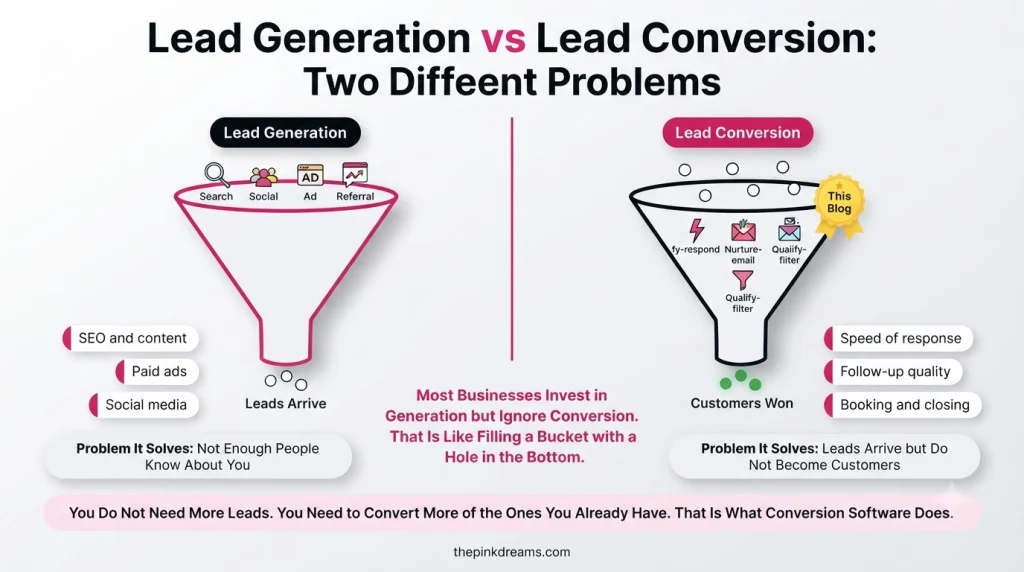
The distinction matters when you are choosing what to buy. Lead generation tools such as ad platforms, SEO tools and form builders exist to create enquiries. Lead conversion tools exist to make sure those enquiries become customers. Many small businesses own several of the first kind and none of the second, which is the equivalent of filling a bucket with a hole in it.
Key Takeaway: Generation tools fill the top of the funnel. Conversion tools stop the leaks below it.
Why Small Businesses Lose Leads After They Arrive
Leads are usually lost to process failures rather than to competitors with better products. The same five causes appear again and again: the enquiry is never recorded, nobody replies quickly, follow-up stops after one attempt, interested people are forgotten, and nobody can say which leads are worth pursuing.
• No single record: enquiries scatter across an inbox, a phone, social messages and a notepad.
• Slow first response: buyers usually contact several suppliers and reward whoever answers first.
• One-attempt follow-up: many sales are won on the third or fourth contact, not the first.
• No nurture for slow buyers: “not right now” becomes “never” without a way to stay in touch.
• No prioritization: urgent, high-value leads receive the same attention as browsers.
• No visibility: without a pipeline view, deals stall quietly and nobody notices until the month ends.
Software fixes these because each is a repeatable failure. Before buying anything, though, it is worth sketching your process, and our guide on building a lead generation process flow chart shows how to map it in an hour.
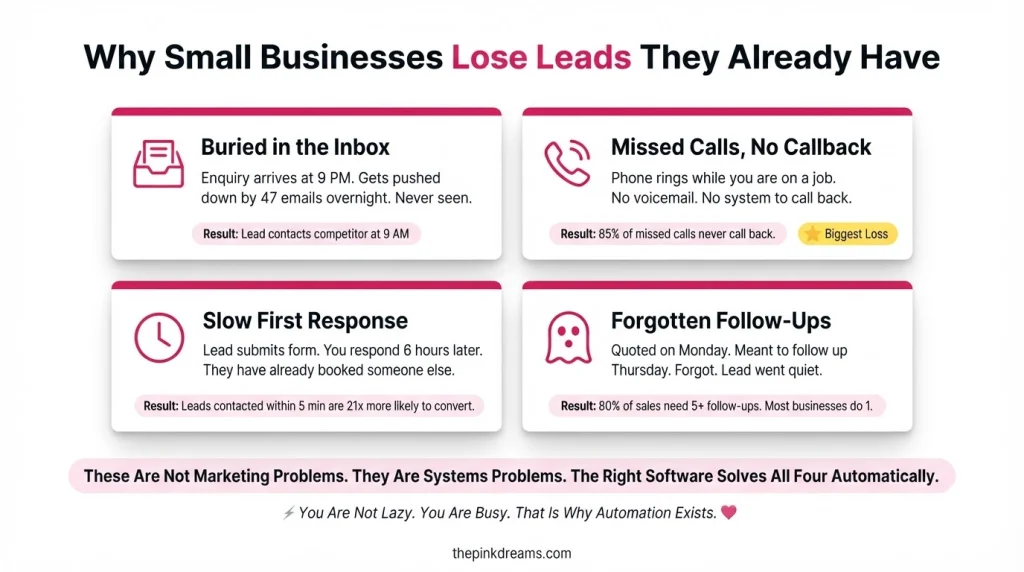
Key Takeaway: Software cannot fix a process you have never defined. It can only make a defined one reliable.
The 6 Jobs Lead Conversion Software Has to Do
Rather than comparing products, judge tools by the six jobs that turn an enquiry into a customer. Most small businesses need the first two immediately, the next two as volume grows, and the last two once several people are involved in selling.
Job 1: Capture and Route Every Lead Into One Place
The first job is making sure no enquiry exists only in an inbox. Lead management software or a CRM collects enquiries from every source, assigns an owner, and keeps the full history of every conversation in one record anybody can find.
What to look for:
• Connections to your website forms, email, phone and messaging channels
• Automatic capture of the source, date and what was asked
• Clear ownership, so one named person is responsible for each lead
• A mobile app, because owners are rarely at a desk when enquiries arrive
• Simple custom fields for the details your business actually needs
Most small businesses start with a general CRM such as HubSpot, Zoho CRM, Pipedrive or Freshsales. Several offer free or low-cost starting tiers, and features change often, so check current plans before committing. Make sure your website feeds them directly, which our guide on how to build a lead generation website covers.
If you have no budget yet: A shared spreadsheet with one row per enquiry, its source, owner and outcome. It is not elegant, but it beats an inbox.
Job 2: Respond Instantly, Even When You Are Busy
The second job is acknowledging every enquiry within minutes. Automatic replies, notifications and chat tools buy you the time to answer properly without the prospect assuming you are not interested and contacting a competitor.
What to look for:
• Instant automated acknowledgements by email or text, with a realistic reply time
• Push notifications to a phone the moment an enquiry arrives
• Live chat or messaging with saved replies for common questions
• Simple chatbots to answer basic questions and collect details outside working hours
• Routing rules so enquiries reach whoever is actually available
Live chat and messaging tools such as Tidio, Crisp or Intercom sit in this category, and most CRMs and email platforms can send an automatic acknowledgement without extra software.
If you have no budget yet: A saved reply on your phone and a rule that every enquiry gets acknowledged before the end of the day.
Job 3: Nurture the People Who Are Not Ready Yet
The third job is staying useful to leads who will buy later. Marketing automation sends a planned sequence of emails or messages after an enquiry, so interest does not fade while you are busy delivering work.
What to look for:
• Simple visual sequence building, without needing technical help
• Triggers based on actions, such as downloading a guide or requesting a quote
• Segmentation by service, location or lead source
• Text messaging where your audience expects it
• Easy suppression, so people who buy stop receiving sales sequences
Email platforms such as Mailchimp, Brevo and ActiveCampaign handle this well, and larger CRMs include it in higher tiers. Our guide to email lead generation covers what those sequences should actually say.
If you have no budget yet: Three diarised follow-ups per lead and one monthly email to everyone who did not buy.
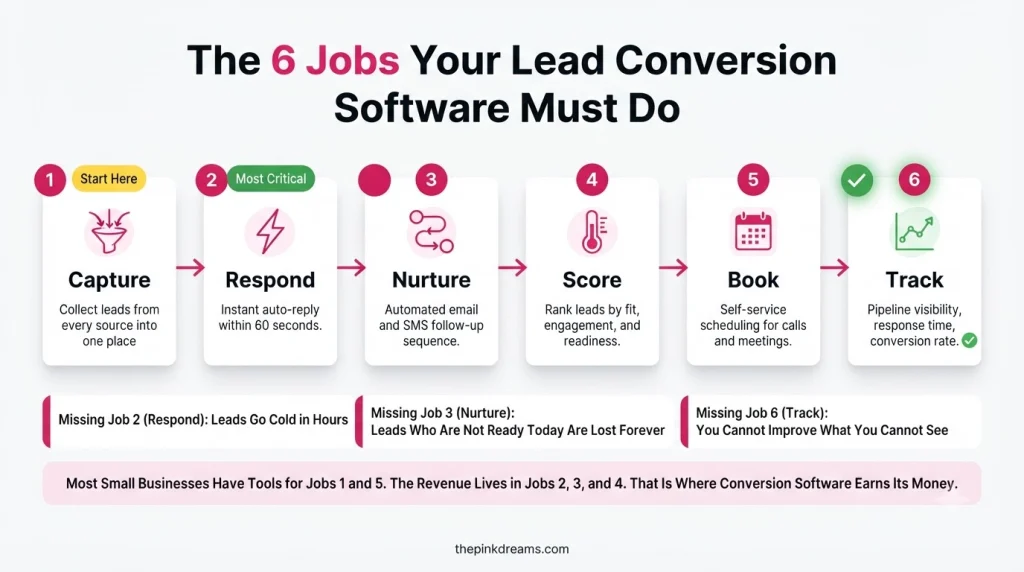
Job 4: Score and Prioritize the Best Leads
The fourth job is telling you who to call first. Lead scoring assigns points based on fit and behaviour, so your limited selling time goes to the enquiries most likely to become customers.
What to look for:
• Scoring rules you can set yourself, without a consultant
• Points for fit, such as location, service and budget signals
• Points for behaviour, such as opening emails or revisiting pricing pages
• A visible ranking in your daily view, not buried in a report
• Alerts when a lead crosses a threshold worth acting on
Scoring is a feature rather than a product, and appears in most established CRMs and marketing platforms. It matters more as volume grows, and is unnecessary while you can personally remember every enquiry.
If you have no budget yet: Three tags: hot, warm and cold, reviewed each morning before anything else.
Job 5: Make It Easy to Book, Quote and Sign
The fifth job is removing friction from the steps between interest and commitment. Scheduling links, quoting tools, electronic signatures and online payments all shorten the gap where deals go cold.
What to look for:
• Booking links that show your live availability and send reminders
• Templated quotes or proposals you can send the same day
• Electronic signature, so agreements do not wait for a printer
• Deposit or payment collection at the point of agreement
• Automatic reminders for unsigned quotes and unpaid invoices
Scheduling tools such as Calendly or Acuity handle bookings, while proposal and signature tools cover the paperwork. Many CRMs now include quoting and e-signature in mid tiers, which is usually cheaper than a separate subscription.
If you have no budget yet: A calendar link in your email signature and a quote template you can send within 24 hours.
Job 6: Track the Pipeline and See What Actually Closes
The sixth job is visibility. A pipeline view shows every open opportunity and its stage, while reporting connects closed business back to the source that produced it, so you know which marketing to repeat.
What to look for:
• A simple visual pipeline with stages that match how you really sell
• Reasons recorded for every won and lost deal
• Reporting on leads and customers by source
• Alerts for deals that have not moved in a set number of days
• Export options, so your data is never trapped in one platform
Pipeline management is standard in every CRM worth buying. Our guide on how to measure lead generation explains which numbers to watch once the data is flowing.
If you have no budget yet: A weekly review of every open quote, with a date for the next action on each one.
How to Choose Lead Conversion Software for a Small Business
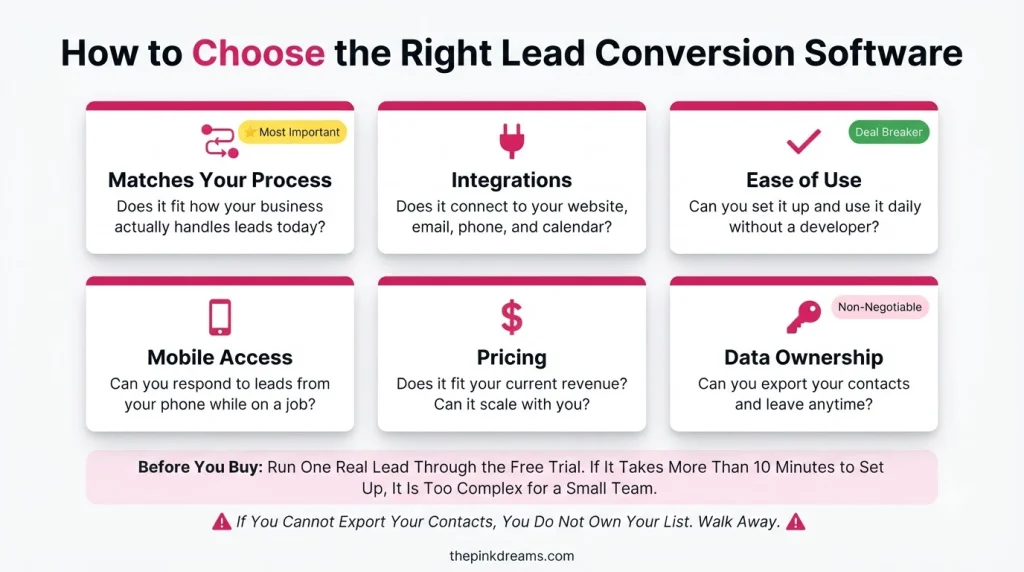
Choose lead conversion software by matching it to your existing process, checking it connects to the tools you already use, and confirming that the people who will use it find it obvious. Feature lists matter far less than adoption, because unused software converts nothing.
• Fit with your process: the tool should reflect how you already sell, with light improvement, not force a rebuild.
• Integrations: your website, email, calendar and accounting tools should connect without manual copying.
• Ease of use: if it needs a training course, a busy owner will quietly stop using it.
• Mobile access: most small business selling happens away from a desk.
• Data ownership and export: check you can take your contacts and history with you before you commit.
• Pricing model: watch for per-user costs, contact-count tiers and the features locked behind higher plans.
• Support and setup: onboarding help is worth more than an extra module you will never open.
• Room to grow: you should not need to migrate again in eighteen months.
Trial properly. Put ten real leads through the tool for two weeks before paying for a year, because a demo shows you the best case and real enquiries show you the truth.
Key Takeaway: Buy the tool your team will use daily, not the one with the most impressive feature list.
Building Your Stack in the Right Order
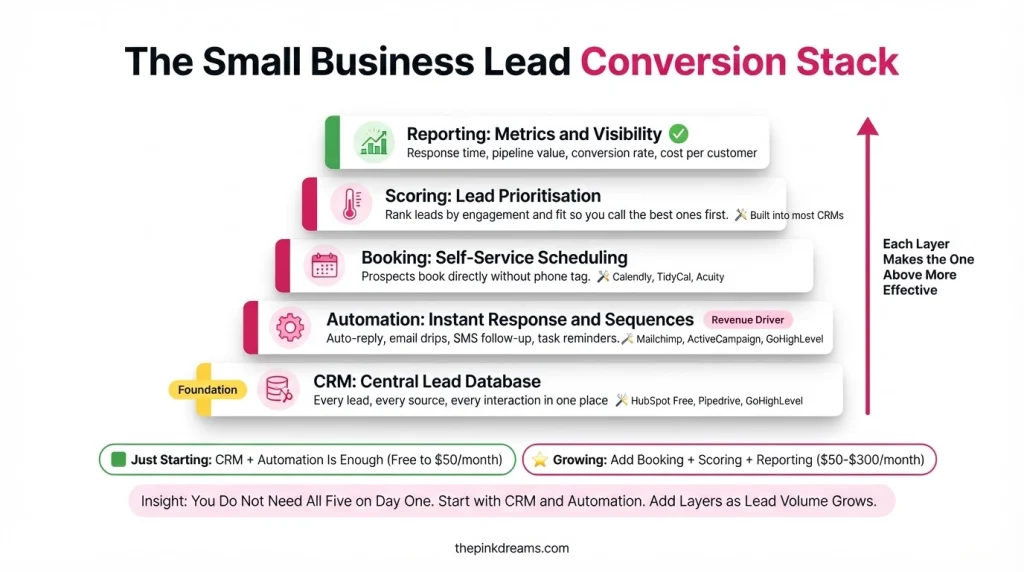
Add tools in the order your bottlenecks appear, not all at once. Most small businesses follow the same path, and buying ahead of that path wastes money on features nobody switches on.
If you are on your own or a team of two or three, you need one thing: a CRM that captures every lead, reminds you to follow up, and works on your phone. Add an automatic acknowledgement email and a booking link, both of which usually come free with tools you already have. That is enough to fix the majority of lost leads.
Once several people handle enquiries, add an email platform for nurture sequences and agree routing rules so every lead has an owner within minutes. This is the stage where a shared inbox starts dropping enquiries, and where a simple pipeline view earns its keep.
As volume grows beyond what you can hold in your head, add lead scoring, quoting or proposal tools, and proper reporting on source through to closed business. By this point the tools should be connected to each other, so a lead entering at the website never needs re-typing anywhere.
Key Takeaway: One tool used properly beats five tools half configured. Add the next only when a real bottleneck appears.
Mistakes Small Businesses Make When Buying Lead Conversion Software
The most common mistakes are buying before defining the process, choosing too many tools at once, ignoring whether anyone will actually use the system, and treating setup as a one-off task rather than an ongoing habit.
• Buying before mapping the process: software automates whatever you already do, including the flaws.
• Too many disconnected tools: every gap between systems is a place leads get lost.
• Ignoring adoption: if the team does not update it, your reporting becomes fiction within a month.
• Choosing on price alone: the cheapest plan often lacks the one feature that would have saved the time.
• Skipping the data import: a CRM without your existing contacts starts life half useless.
• No defined stages: a pipeline with vague stages tells you nothing about where deals stall.
• Never reviewing it: processes drift, so an annual look at what you use and what you pay for is worth the hour.
If you are unsure whether your problem is software or process, a lead generation audit will tell you before you spend anything.
Key Takeaway: Most software disappointment is really a process or adoption problem wearing a subscription.
How to Tell Whether Your Lead Conversion Software Is Working
Judge the software on outcomes rather than features. Four numbers show whether it is earning its cost: average response time, the share of leads that receive a complete follow-up sequence, the enquiry-to-customer conversion rate, and how long deals take to close.
• Average response time: should fall noticeably within the first month of use.
• Follow-up completion rate: how many leads received every planned contact rather than just the first.
• Enquiry-to-customer rate: the number the whole stack exists to improve.
• Time to close: faster quoting and booking should shorten it.
• Leads lost to no response: should approach zero once acknowledgements are automated.
• Cost per closed customer: including software subscriptions, so you can see the real return.
Take a baseline before you buy anything, even a rough one. Without it, you will never know whether the subscription improved results or simply gave you somewhere tidier to store them.
Key Takeaway: If response time and conversion rate have not moved after 90 days, the tool is not the problem you thought it was.
Choosing Lead Conversion Software That Actually Closes More Leads
Lead conversion software is worth buying because the enquiries you already receive are the cheapest sales opportunities your business will ever have. Everything above is aimed at one outcome: making sure no enquiry is forgotten, every interested person hears from you quickly, and the ones who are not ready yet are still there when they are.
If you are starting with nothing, the sequence is simple. Map your process on one page, pick a CRM that works on your phone, put every enquiry into it for a month, and set an automatic acknowledgement so nobody waits. That alone recovers more revenue in most small businesses than any new marketing campaign, because it stops losses rather than chasing additions.
Everything after that is an upgrade rather than a rescue. Add nurture sequences when you notice slow buyers drifting away, scoring when you can no longer remember every lead, and quoting tools when paperwork is the step that stalls. Buy each one because something specific is breaking, and the stack stays small, affordable and genuinely used.
If you would rather have specialists set this up and connect it to your marketing, Pinkdreams can help. Pinkdreams is a digital marketing agency that helps businesses attract more customers through search, paid media, content and conversion-focused strategy. Our team reviews your current visibility and pipeline, builds a customized roadmap, and handles the work needed to turn enquiries into clients. Request a free digital presence audit to see where you stand.
FAQ
What is lead conversion software?
Lead conversion software is any tool that helps turn existing leads into customers. It records enquiries in one place, prompts or automates follow-up, nurtures people who are not ready to buy, scores leads by priority, simplifies booking and quoting, and tracks deals through a pipeline so nothing stalls unnoticed.
What is the difference between lead generation and lead conversion software?
Lead generation software creates enquiries through advertising, search, forms and outreach. Lead conversion software manages what happens after an enquiry arrives, including follow-up, nurturing and closing. Many small businesses invest heavily in generation tools while relying on an inbox for conversion, which is where most revenue is lost.
Do small businesses need a CRM?
A CRM is worthwhile as soon as you receive regular enquiries or more than one person handles them, because it prevents missed follow-ups and shows which sources produce customers. At very low volumes a spreadsheet can work, provided every enquiry, its source and its outcome are recorded consistently.
How much does lead conversion software cost?
Costs vary widely by tool, country and number of users or contacts, and several established CRMs offer free starting tiers. Rather than comparing monthly prices, compare the total cost against what one recovered customer is worth to you, and check which features sit behind higher plans.
What should I buy first?
Start with a CRM that captures every lead and works on your phone, then add an automatic acknowledgement and a booking link, both of which are often included with tools you already have. Add nurture sequences, lead scoring and quoting tools later, when a specific bottleneck appears.

Digital Marketing Strategist & Business Coach
As a leading digital marketing strategist and business coach, he is responsible for helping entrepreneurs and brands grow faster in a smarter, more scalable way. With over 20 years of experience, Nagarajan specializes in practical coaching, automation-first marketing strategies, and technology-driven growth systems. His work focuses on enhancing brand visibility, improving performance, and building sustainable frameworks that enable long-term business success.