




How to write a Facebook Page description, About section and categories that tell people exactly what you do.
Someone taps your Facebook Page, reads one line under your name, and decides in two seconds whether to keep scrolling. That line is usually the last thing an owner writes and the first thing a customer reads.
How to describe your business on Facebook comes down to four fields: the short description under your Page name, the longer About section, your Page categories, and your contact and service details. Description work sits at the front of every social media marketing service that actually works, because it is what tells Facebook who to show you to. It also matters when you use Facebook advertising, because people who click an ad need to see a Page that immediately confirms what your business offers. Each field does a different job. Written well, they tell people why to pick you. Written badly, the Page stays invisible even to customers who already like it.
Key Takeaways
- Facebook asks you to describe your business in four separate places, and most owners only fill in one of them.
- Meta’s own guidance is to keep the short description to one or two sentences. It is a summary, not the whole story.
- The About section is where the longer story belongs, including when you founded the business, what you specialise in and your mission.
- You can select up to three Page categories, and choosing specific ones rather than generic ones directly affects who finds you.
- Categories are not decorations. They influence Facebook search, recommendations, local results and which related Pages you appear alongside.
- Write for the customer’s question, not your own job title. People search for what they need, not what you call yourself.
- Contact details, service areas and hours belong in the description work too, because an incomplete Page reads as an inactive one.
- Update the description when the offer changes. A stale Page description is one of the most common reasons enquiries dry up.
The Two Sentences That Decide Whether Someone Contacts You
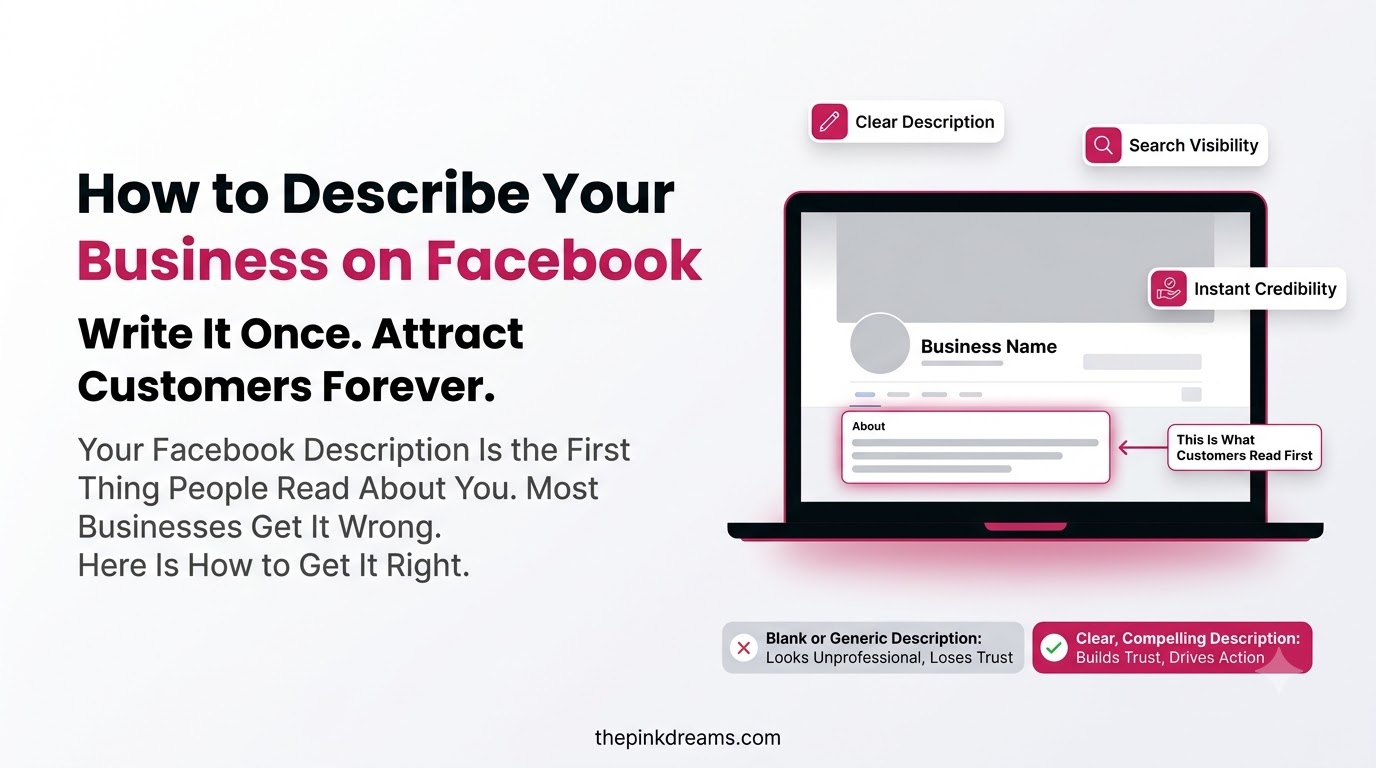
Your Facebook Page description is the short bio that sits with your Page name and tells visitors what your business offers. Meta’s Business Help Centre guidance is deliberately blunt about the length: keep it brief, at one to two sentences. It is a summary line, not a company history.
That constraint is the reason most descriptions fail. Owners try to fit the founding story, the values, the full service list and a slogan into a space designed for one clear statement. The result reads like a compressed brochure, and a reader who cannot work out what you sell in one glance leaves.
The description that works answers three things at once: what you do, who you do it for, and where. Everything else has somewhere better to live.
Key Takeaway: The short description is a summary, not a story. One clear sentence about what you sell and who you sell it to beats three vague ones.
Why Your Facebook Business Page Description Matters for Search and Discovery
Your Page description and categories are how Facebook decides which searches and recommendations your business belongs in. They are also the first credibility check a human makes. A Page with a clear description and complete details reads as an active business. A blank one reads as abandoned, whether or not it is.
• Facebook search: people do search inside Facebook, and your categories and description determine whether you appear.
• Recommendations: when someone asks their local group for a supplier, Facebook surfaces Pages that match the category.
• Location results: your Page can appear when people look for businesses near them, provided your address is current.
• Related Pages: Facebook groups similar Pages together, so your category decides which company you keep.
• First impressions: the description is the only thing many visitors read before deciding to message you or leave.
• Ad performance: a credible, complete Page lifts click-through on your ads, which lowers what you pay per result.
This is also where organic and paid work meet. A well-described Page makes how to advertise your business on Facebook a cheaper exercise, because people who click your ad land on something that confirms the promise instead of raising doubt.
Key Takeaway: The description is not just a copy. It is the input Facebook uses to decide who sees your business at all.
The Four Places Facebook Asks You to Describe Your Business
Facebook splits your business description across four fields, and each one has a different job. The short description summarises the offer, the About section tells the story, the categories tell Facebook what you are, and the contact details prove you are real and reachable.
| Field | What it is for | Length to aim for |
| Short description or bio | A one-line summary of what you offer | One to two sentences |
| About section | The fuller story, specialisms and mission | A few short paragraphs |
| Categories | Telling Facebook what type of business you are | Up to three, most specific first |
| Contact and location details | Phone, website, email, address, hours, service areas | Complete, and kept current |
Owners typically fill in the first one, skip the second, guess the third and forget to update the fourth. Doing all four properly takes about twenty minutes and is the single cheapest improvement available to most Pages.
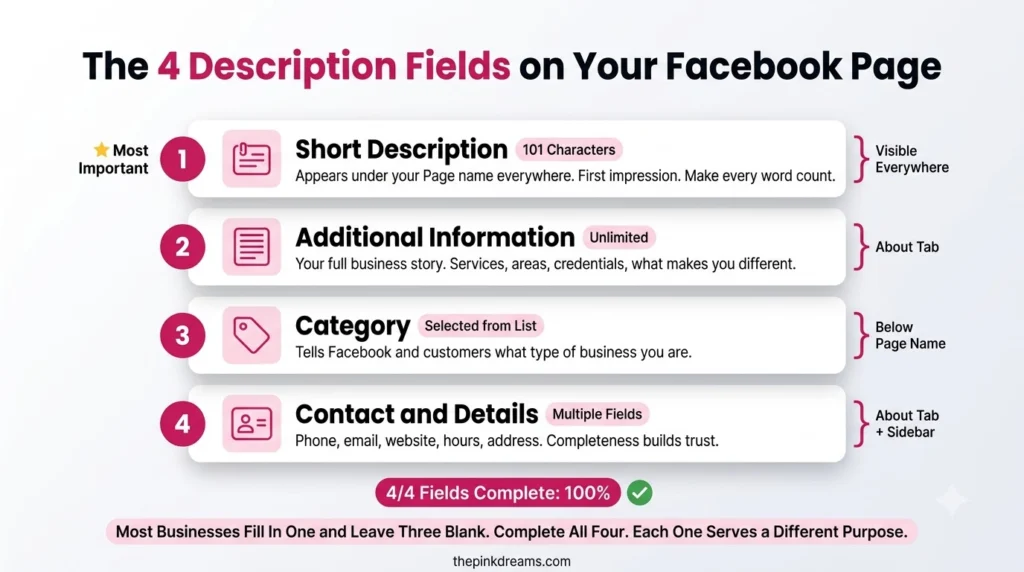
Key Takeaway: Treat these as four different jobs. Repeating the same paragraph in all four fields wastes three of them.
How to Describe Your Business on Facebook: The Six Steps
To describe your business on Facebook, decide what you actually sell and to whom, write a one-line description, choose up to three specific categories, expand the story in the About section, complete every contact and service field, then review it against how customers actually search.
1. Decide what you sell, in the customer’s words
Before writing anything, finish this sentence: we help [who] with [what] in [where]. Use the words a customer would use, not internal terminology. Someone looking for help does not search for “integrated solutions provider”. They search for the thing they need done.
2. Write the short description as one clear sentence
Follow the offer, audience and location formula, then stop. “Family-run bakery supplying fresh sourdough and celebration cakes to homes and cafés across the north of the city” tells the reader everything they need. Adding “passionate about quality since day one” adds nothing a competitor could not also claim.
3. Choose up to three categories, most specific first
Facebook lets you select up to three categories. Meta’s own best-practice guidance is to choose the most relevant and specific option rather than a general one. Their example is a sweet shop: choosing “bakery” or “dessert shop” helps the right people find you, while a broad label like “local business” does not.
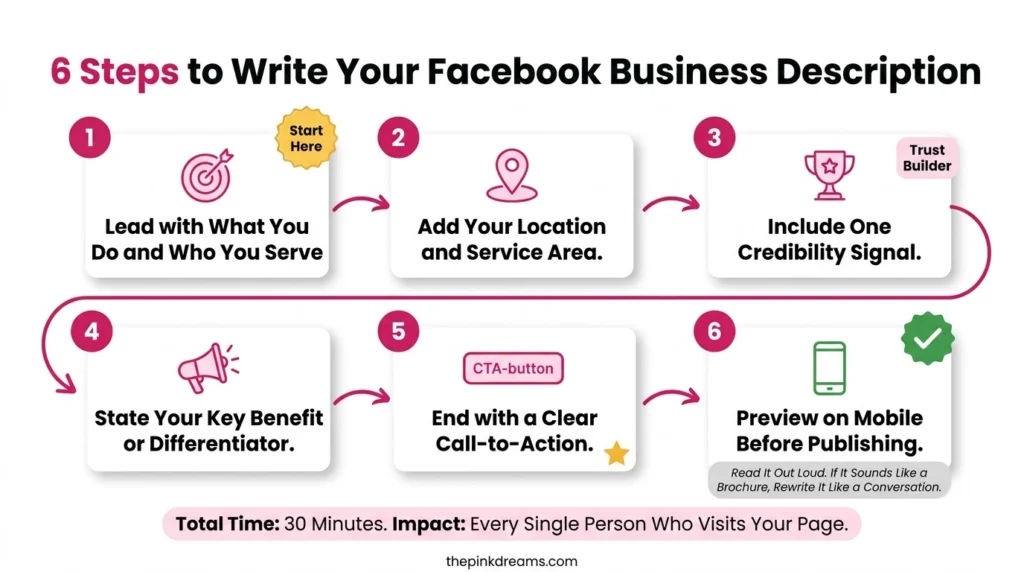
4. Use the About section for the story the description cannot hold
This is where the longer version belongs. Meta suggests including when you founded the business, what you specialise in and your mission. Keep it in short paragraphs, lead with what you do rather than when you started, and include the service areas and specialisms that a one-line description had no room for.
5. Complete every contact and service field
Add your phone number, website, email, opening hours and address if you have a physical location, plus your service areas and list of services. Incomplete Pages lose enquiries silently, because a visitor who cannot find a phone number rarely goes looking for one.
6. Read it back as a customer, not as the owner
Open the Page on a phone and read only what appears above the fold. If a stranger could not say what you sell, who you serve and where, rewrite the first sentence. This is the test that catches almost every weak description, and it takes thirty seconds.
Key Takeaway: Write the description last and the positioning first. The sentence is only hard to write when the offer is still vague.
How to Choose the Right Facebook Page Categories
Facebook Page categories tell the platform what kind of business you run, and you can select up to three. Choose the most specific category that genuinely fits, then add secondary ones only if they describe real parts of the business. Categories affect search, recommendations, local discovery and which related Pages you appear beside.
Specific beats are broad every time. A category that describes exactly what you sell puts you in front of people looking for exactly that. A generic one puts you in a crowd.
• Pick the precise one first. Your main category appears on the Page, so it should describe the business at a glance.
• Use the second and third for real services, not aspirations. Categories you do not actually serve produce enquiries you cannot fulfil.
• Check what the category unlocks. Some categories give the Page features others do not, such as booking or menu tools.
• Revisit after a pivot. A category chosen three years ago often describes a business that no longer exists.
The most common mistake is choosing a category that sounds impressive over one that is accurate. The second most common is never checking it again. Both quietly remove you from the searches you should be winning.
Key Takeaway: Specific categories find customers. Generic categories hide you among everyone else who also picked “local business”.
Facebook Page Description Examples by Business Type
The formula stays the same across industries: what you do, who for, where. What changes is which detail earns the limited space. Use these as structural patterns rather than copy to lift.
| Business type | What the description must lead with | Example structure |
| Local trade or service | The service and the area covered | Service, customer type, coverage area |
| Retail or ecommerce | The product range and what makes it distinct | Product category, distinguishing feature, delivery reach |
| Restaurant or café | Cuisine, format and location | Food type, dine-in or delivery, neighbourhood |
| Professional services | The problem solved and who for | Specialism, client type, market served |
| Health and wellbeing | The service and any credential that matters | Treatment or discipline, who it suits, location |
| Creator or maker | What you make and what makes it yours | Product, materials or method, where you ship |
Two rules apply to all of them. Lead with the noun a customer would search for, and put the location in the sentence rather than assuming Facebook will infer it.
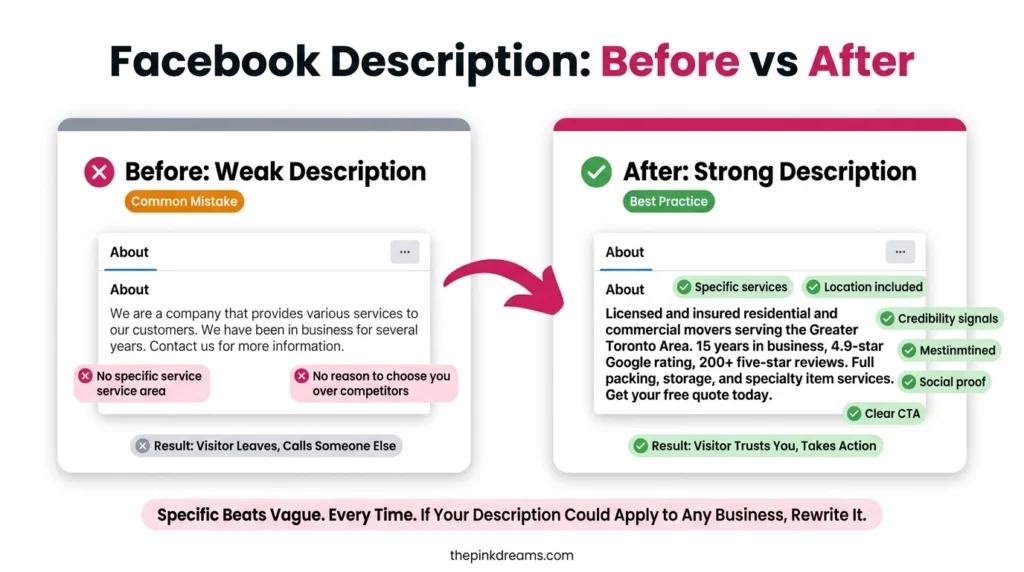
Key Takeaway: Every strong description names a thing, a person and a place. Weak ones name adjectives.
Page Description vs About Section: What Goes Where
These two fields get confused constantly, and the confusion produces Pages that say the same thing twice while leaving obvious questions unanswered. The description is the headline. The About section is the article.
| Question | Short description | About section |
| Purpose | Summarise the offer | Tell the fuller story |
| Length | One to two sentences | Several short paragraphs |
| Who reads it | Everyone who lands on the Page | People already interested |
| Should include | What, who for, where | Founding, specialisms, mission, service detail |
| Should not include | Founding story, values, slogans | Repetition of the description |
| How often to update | When the core offer changes | When the business changes |
The honest test is this: if someone read only your short description, would they know whether to contact you? If yes, it is doing its job. If they would need to read the About section to find out what you sell, the description has failed and the About section is carrying work it was never meant to do.
Key Takeaway: The description decides whether they keep reading. The About section rewards them for doing so.
Facebook Page Description Mistakes That Cost You Enquiries
• Leading with the founding year: nobody chooses a supplier because it opened in 2014. Lead with what you sell.
• Writing in slogans: “excellence delivered” describes no business and excludes no competitor.
• Omitting the location: local searchers need to know you serve them, and Facebook uses that signal too.
• Choosing a vague category: broad categories put you in a crowd instead of a search result.
• Copying the same text into every field: four fields exist because four different jobs need doing.
• Leaving contact fields blank: an unreachable Page reads as an inactive business, even a busy one.
• Never updating it: businesses change what they sell far more often than they change their Page.
• Writing for yourself: internal job titles and industry terms do not match how customers search.
Key Takeaway: Almost every one of these is fixed in a single sitting, which makes them the cheapest wins available on the whole Page.
How to Track Whether Your Facebook Page Description Is Working
Facebook Page Insights shows whether your description and categories are doing their job. The numbers worth watching are Page views, reach, follows and the actions people take, such as clicking your website link, tapping call, or sending a message. Together they tell you whether people are finding the Page and whether they act once they arrive.
• Page views: are people arriving at all? A rise after a category change usually means the new category is working.
• Reach and impressions: how far your Page and posts travel beyond existing followers.
• Follows: whether visitors decide the business is worth keeping an eye on.
• Actions on the Page: clicks to your website, calls and messages. This is the closest thing to a conversion signal.
• Audience demographics: whether the people arriving are the ones you meant to attract.
Read them as a pair. Plenty of views with almost no actions usually means the description is not convincing. Few views with a decent action rate usually means the description is fine but the categories or content are limiting discovery. The first is a copy problem, the second is a visibility problem, and treating one as the other wastes months.
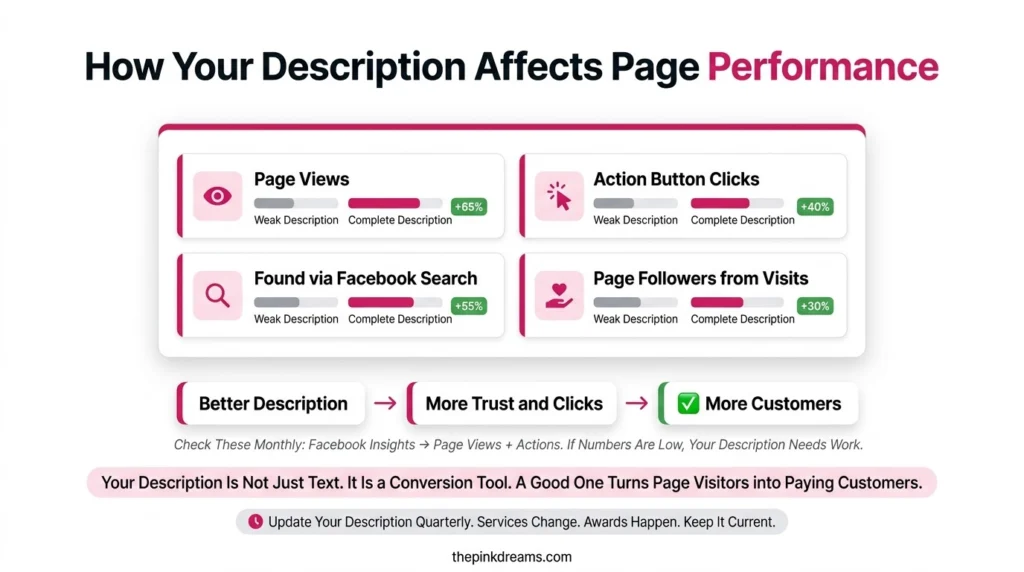
Key Takeaway: Views measure discovery. Actions measure persuasion. You need to know which one is broken before you rewrite anything.
Final Verdict: How Should You Describe Your Business on Facebook?
If you want the short version of how to describe your business on Facebook: write one sentence naming what you sell, who it is for and where you work, choose the most specific categories available, expand the story in the About section, and complete every contact field. Then check Insights in a month.
| Start here | If this describes you |
| Rewrite the short description | Visitors arrive but rarely message or call |
| Change your categories | Almost nobody finds the Page through Facebook search |
| Fill in the About section | People ask questions your Page already should have answered |
| Complete contact and hours | Enquiries come in asking whether you are still trading |
| Review everything quarterly | The business has changed but the Page has not |
The wider point is that description work is positioning work wearing a smaller hat. The Pages that describe themselves well are usually run by owners who know exactly who they serve. If the sentence is hard to write, the problem is rarely the writing. Clear positioning also makes everything downstream cheaper, from content marketing services to SEO services, because every channel is repeating the same clear message rather than inventing a new one. The same discipline applies off Facebook too, which is why Google Business Profile optimization usually improves at the same time.
So block out twenty minutes this week. Open the Page on a phone, read what a stranger would read, and fix the first sentence.
And if the harder problem is not describing the business but getting enough of the right people to see it, Pink Dreams can help. Pink Dreams is a digital marketing agency that helps businesses attract more customers through social, search, content and conversion-focused strategy. Our team reviews your current visibility, builds a customised roadmap, and handles the work needed to turn profiles and Pages into a consistent source of enquiries. Request a free digital presence audit to see where you stand.
FAQ
How long should a Facebook business Page description be?
Meta’s own guidance is to keep the short description brief, at one to two sentences. It is meant to summarise what your business offers, not to tell the full story. Anything longer belongs in the About section, where visitors who are already interested will read it properly.
What is the difference between the Facebook Page description and the About section?
The description is a one-line summary that tells visitors what you sell. The About section is the longer version, where Meta suggests including details such as when you founded the business, what you specialise in and your mission. The description decides whether people keep reading. The About section rewards them when they do.
How many categories can a Facebook business Page have?
You can select up to three categories for a Facebook Page. Meta advises choosing the most relevant and specific options rather than broad ones, because categories affect whether you appear in Facebook search, recommendations and local results, and which related Pages your business is shown alongside.
Does my Facebook Page description affect search results?
Yes, within Facebook. Your description and categories help Facebook understand what your business does, which affects search, recommendations and local discovery on the platform. Outside Facebook, a complete and consistent Page supports your wider online presence, though your website remains the main driver of search engine rankings.
How often should I update my Facebook business Page description?
Review it whenever your core offer, service areas or hours change, and check it at least once a quarter. Outdated descriptions are a common and invisible cause of falling enquiries, because visitors assume a Page describing services you no longer offer belongs to a business that is no longer active.

Digital Marketing Strategist & Business Coach
As a leading digital marketing strategist and business coach, he is responsible for helping entrepreneurs and brands grow faster in a smarter, more scalable way. With over 20 years of experience, Nagarajan specializes in practical coaching, automation-first marketing strategies, and technology-driven growth systems. His work focuses on enhancing brand visibility, improving performance, and building sustainable frameworks that enable long-term business success.