




How to set up, launch and measure your first Facebook ad campaign, without burning a month’s budget learning the interface.
Every guide says Facebook advertising is simple. Then you open Ads Manager, find a wall of campaign objectives and a budget field with no hint of what a sensible number looks like.
How to advertise your business on Facebook comes down to four decisions: the objective, the audience, the budget and the creative. Everything else is set up once. Paid ads generate the enquiry, but the social media marketing services and follow-up behind them decide whether it becomes a sale. Meta handles delivery and bidding automatically, so your job is telling the system what a good outcome looks like, then giving it something worth showing.
Key Takeaways
- Facebook advertising is set up once and optimized continuously. The setup is the easy part.
- Ads run from a Facebook Business Page, so the Page has to exist and look credible before you spend anything.
- Build the ad account inside Meta Business Suite, never inside a personal profile, or the business can lose access to its own data.
- Install the Meta Pixel and Conversions API before the first campaign. Without tracking you are optimizing blind.
- The campaign objective decides how Meta delivers your ads. Choose Leads for enquiries, not Traffic.
- Facebook ad costs are auction-based. There is no fixed rate, and averages from other countries are not your benchmark.
- Narrow targeting beats broad targeting on a small budget. Advertise to an area you can actually serve.
- Most failed campaigns are follow-up failures rather than creative failures. Leads that wait a day are usually gone.
The Machine Behind Every Facebook Ad You Have Ever Seen
Facebook ads are paid placements bought through Meta’s advertising platform and shown across Facebook, Instagram, Messenger and the Audience Network. You choose an objective, an audience and a budget. Meta’s auction then decides which ad each person sees, and you are charged for impressions or actions rather than for a fixed slot.
The important part is that you are not buying a position. You are entering an auction that Meta’s own advertising documentation describes as balancing three things: your bid, how likely the system thinks that person is to take your chosen action, and the quality of the ad itself. A relevant, well-made ad can win placements against a much larger budget, which is the single most useful fact available to a small advertiser.
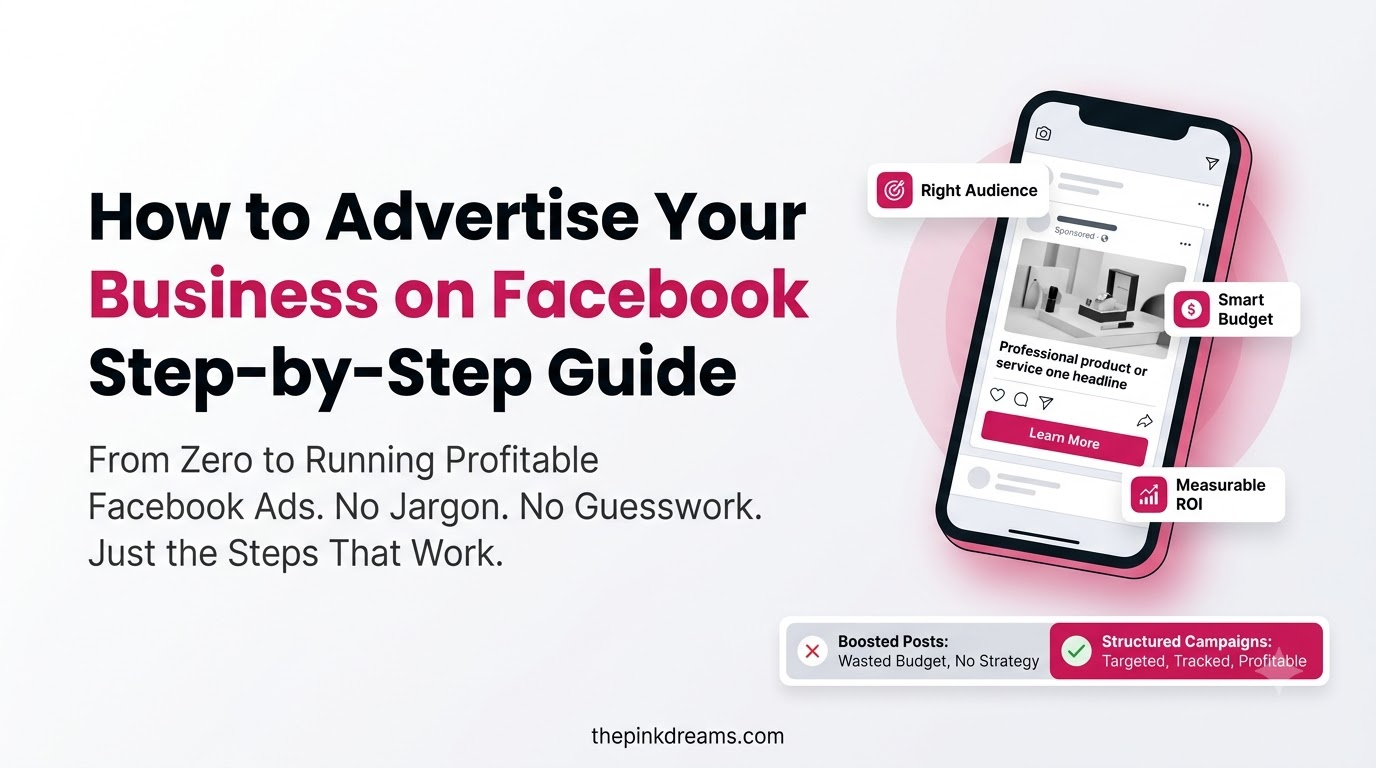
That also explains why boosting a post rarely works well. Boosting is a stripped-back version of the same auction with fewer objectives and far less targeting control, so you enter the same competition with worse instructions.
Key Takeaway: Facebook advertising is an auction, not a rate card. Relevance is the lever a small budget can actually pull.
Why Advertise Your Business on Facebook?
Advertising your business on Facebook reaches people by location, life stage and behaviour instead of waiting for them to search. Search ads capture demand that already exists. Facebook creates it, by putting your offer in front of the right people before they start looking for a supplier.
• Low entry cost. You set a daily budget rather than committing to a large upfront spend, then scale what works.
• Targeting you control. Location radius, age and behaviour signals stop you paying to reach people outside your service area.
• One campaign, four surfaces. A single Meta campaign can run on Facebook, Instagram, Messenger and the Audience Network.
• Real measurement. Ads Manager reports cost per lead and cost per sale, not just impressions.
• Retargeting. You can show a second ad only to people who visited your pricing page and left without enquiring.
• Creative that does not need a studio. Phone-shot video of real work consistently outperforms polished stock imagery for local businesses.
The most common mistake here is treating Facebook like a billboard. An ad that shows a logo and the words “Book today” gives the auction nothing to work with. An ad that shows the work, names the area and makes one clear offer gives it plenty.
Key Takeaway: Use Facebook to create demand early, then use retargeting to recapture the people who did not act the first time.
Facebook Ad Account Structure: Business Suite, Ads Manager, Campaigns and Ad Sets
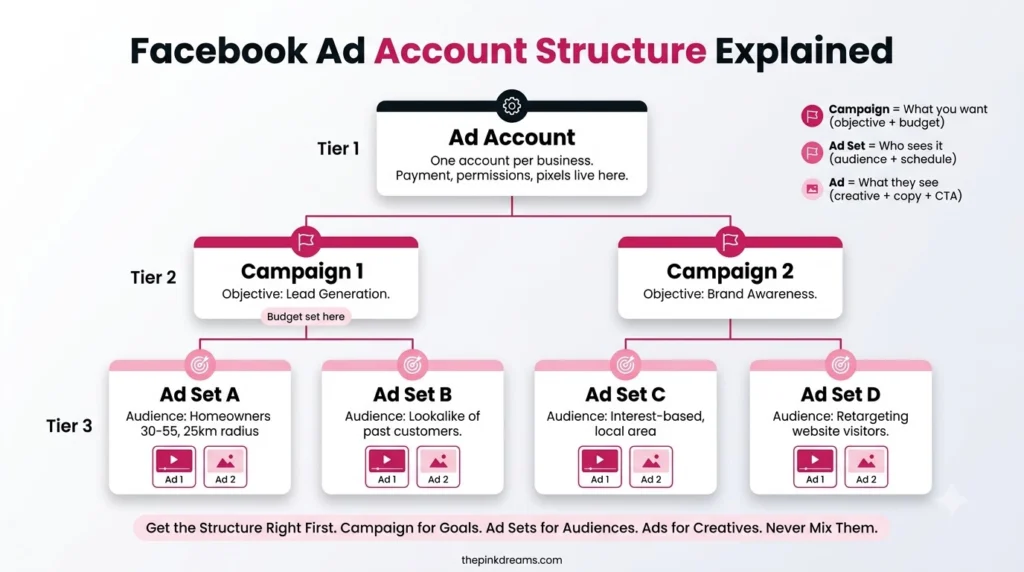
A Facebook ad account has three live levels. The campaign holds your objective, the ad set holds your audience, budget, schedule and placements, and the ad holds the creative people actually see. Meta Business Suite and Meta Ads Manager are the two tools you use to manage all three.
Before building anything, it helps to know what each asset does:
• Facebook Business Page: your public business presence. Ads run from it, so it is required.
• Meta Business Suite: the container holding your Page, ad account, Pixel and user permissions.
• Ad account: where billing, currency and delivery live. Currency and time zone cannot be changed later.
• Meta Pixel and Conversions API: the tracking that tells you which ads produced enquiries.
| Level | What it controls | A worked example |
| Campaign | Objective and budget strategy | “Leads: Spring Enquiries” |
| Ad set | Audience, placements, budget, schedule | Adults 28 to 65 within 25 km, weekdays only |
| Ad | Creative, copy, format, destination | Vertical video plus an instant lead form |
Set this up in the right order and you never touch it again. Set it up inside a personal Facebook profile and you will eventually discover that the business does not own its own Pixel data, audiences or ad history.
Key Takeaway: Build the account structure once, properly, with the business as the owner of every asset.
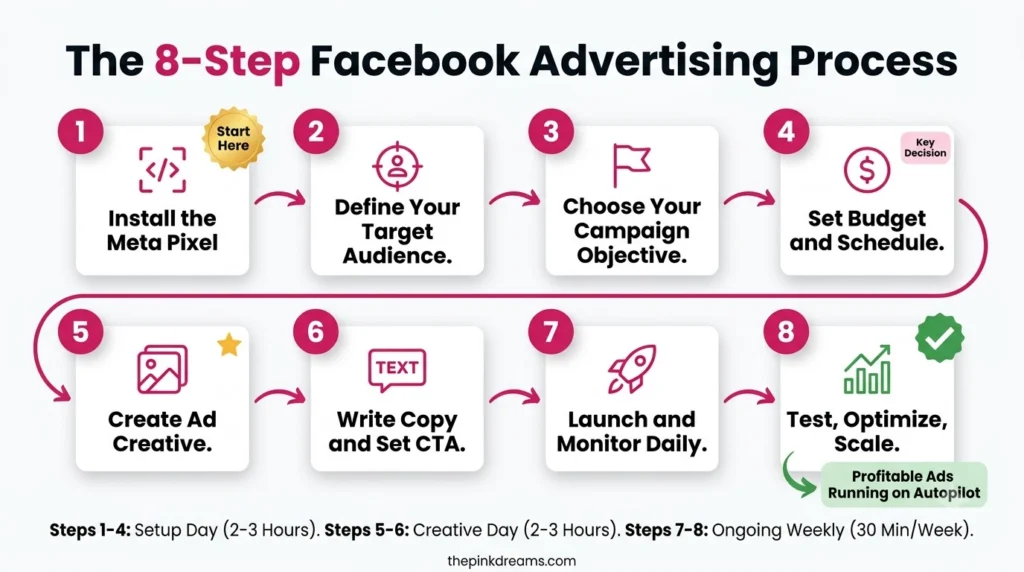
How to Advertise Your Business on Facebook: The Eight Steps
To advertise your business on Facebook, create a Business Page, set up Meta Business Suite and an ad account, install tracking, then build a campaign in Ads Manager by choosing an objective, defining an audience, setting a budget, uploading creative and publishing. Reporting begins the moment the campaign goes live.
1. Set up your Facebook Business Page
Add your trading name, service areas, phone number, opening hours and a link to your enquiry page. Include proof of legitimacy: insurance, accreditation, years in business, or association membership. Credibility on the Page lifts click-through and conversion rates, which lowers what you pay per result in the auction.
2. Create a Meta Business Suite account and ad account
Open Meta Business Suite, create a business portfolio, add your Page, then create an ad account inside it. Choose the correct billing currency now, whether that is CAD, USD, GBP, AUD or AED. Currency and time zone are fixed at creation, and changing them later means starting a new ad account.
3. Install the Meta Pixel and Conversions API
The Meta Pixel is a snippet of code on your website that reports visitor actions back to Meta. The Conversions API sends the same events from your server, which keeps measurement working when browser tracking is blocked. Install both, then define the one event that matters: usually a completed enquiry form or a booked call.
4. Choose your campaign objective
Meta optimises delivery towards whatever objective you pick, so pick the one that matches the action you want. Leads suits enquiry generation, Sales suits online purchases, Traffic suits driving readers to a page, and Awareness suits building recognition in a new area. Choosing Traffic when you want enquiries is the most common way small budgets get wasted.
5. Build your audience and targeting
Set a location radius around the area you serve rather than a whole country. Layer age and any relevant behaviour signals, then exclude existing customers if you are chasing new business. One caveat worth checking: Meta restricts detailed targeting for special ad categories including housing, employment, credit and some social issues. If your offer touches any of those, confirm the current policy before you build the audience.
6. Set your budget and schedule
Choose a daily or lifetime budget and set start and end dates. Give the campaign enough budget and enough time to leave the learning phase, the period where delivery stays unstable until Meta gathers enough conversion data. Editing the campaign daily restarts that phase every time, which is why impatient advertisers often pay the most.
7. Create the ad and choose the format
Write a copy that answers one question: why should this person trust you over the other options in their feed? Lead with the offer, name the area, and show real work. Use vertical video for Reels and Stories, square or 4:5 images for the feed, and always add captions, because most feed video is watched with the sound off.
8. Publish, then read the right numbers
Publish and leave it alone for at least a week. In Ads Manager, watch cost per lead, click-through rate and conversion rate rather than impressions. Judge quality as well as volume: fifty cheap enquiries from outside your service area are worth less than five local ones. Feed what you learn into the next round rather than rebuilding from scratch.
Key Takeaway: The order matters more than the effort. Tracking before campaign, objective before audience, audience before creative.
Which Facebook Ad Formats Work Best for Small Businesses?
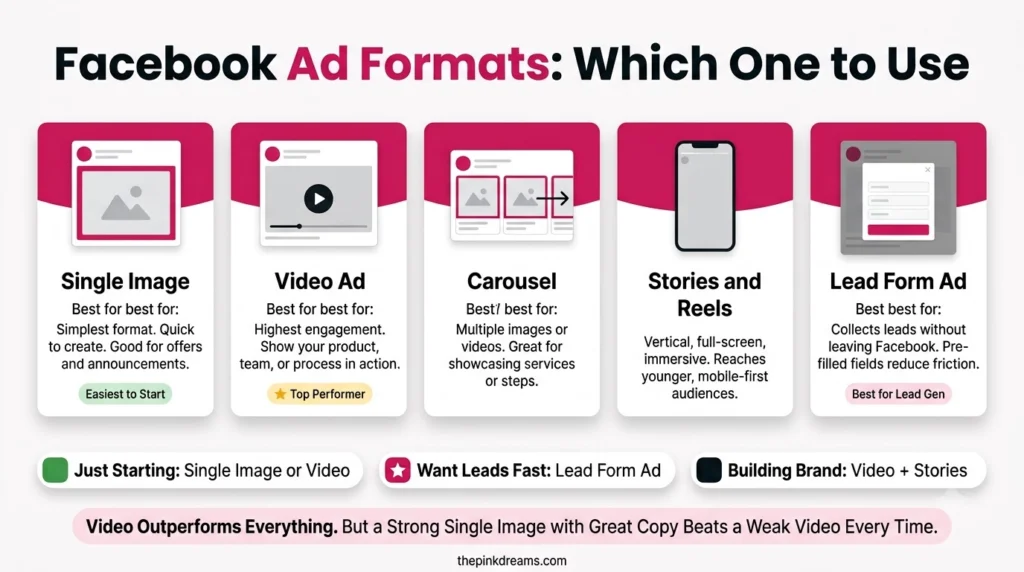
The formats that work hardest for small businesses are short video, single image, carousel and lead form ads. Video builds trust by showing the work, carousels explain multi-part services, and lead forms capture enquiries without asking anyone to leave Facebook. Format should follow the objective, not personal preference.
| Format | What it does well | Use it for |
| Short video and Reels | Shows the work, the team and the process | Awareness in a new area |
| Single image | Fast to produce, easy to test | Offers and seasonal promotions |
| Carousel | Several panels inside one ad | Explaining a multi-step service |
| Lead form | Captures details inside Facebook | Enquiries on mobile |
| Messenger ads | Opens a conversation | Availability and quick questions |
Run one video ad and one image ad inside the same ad set and let delivery decide between them. Testing one variable at a time teaches you something. Testing ten teaches you nothing.
Key Takeaway: Video that shows real work beats stock imagery for almost every local business.
How Much Does It Cost to Advertise on Facebook?
Facebook advertising costs are set by auction, so there is no published rate. What you pay per result depends on your audience size, local competition, the season, the objective and how relevant your creative is. Budget for the total, not the daily figure, and benchmark against your own account rather than an average from another market.
| Cost | What it covers | Who pays it |
| Ad spend | The auction itself, charged per impression or action | Everyone |
| Creative production | Video, photography, design, copy | Most advertisers, at some level |
| Landing page | The page the ad sends people to | Anyone not using lead forms |
| Tracking setup | Pixel and Conversions API installation | One-off, usually technical |
| Management | Your time, or an agency or freelancer | Everyone, whether or not it is invoiced |
Two costs surprise people. The first is creative, because ads fatigue and need replacing far sooner than most owners expect. The second is the learning period, since early spend buys data rather than sales, and cutting a campaign off before it stabilises means paying for the education without collecting it.
Key Takeaway: Model the total cost of a three-month test, not a daily budget. Campaigns judged after four days are almost always judged wrongly.
Advertising Across Borders: What Changes in Each Market
The mechanics of Facebook advertising are identical everywhere, but the context is not. Currency, peak demand, the words your customers use and the advertising rules you must follow all change by country. Confirm these before running the same campaign in a second market.
| Market | Ad account currency | Advertising rules to verify |
| Canada | CAD | Competition Bureau advertising guidance and provincial consumer protection rules |
| United States | USD | FTC truth-in-advertising principles and Meta’s special ad category rules |
| United Kingdom | GBP | ASA and CAP advertising codes |
| Australia | AUD | Australian Consumer Law and ACCC guidance |
| UAE, including Dubai | AED | Local trade licence requirements and national advertising and media regulations |
Two practical points. Seasonality is not universal, so a campaign calendar built around a northern-hemisphere summer will be wrong in Australia. And terminology matters more than it sounds: the same service is described differently in each market, and ad copy written in the wrong dialect quietly lowers click-through rates.
Rules change and are enforced differently by country. Confirm your obligations with the relevant regulator, or a local adviser, before launching claims in a new market.
Key Takeaway: Copy the campaign structure across markets. Never copy the currency, the calendar or the wording.
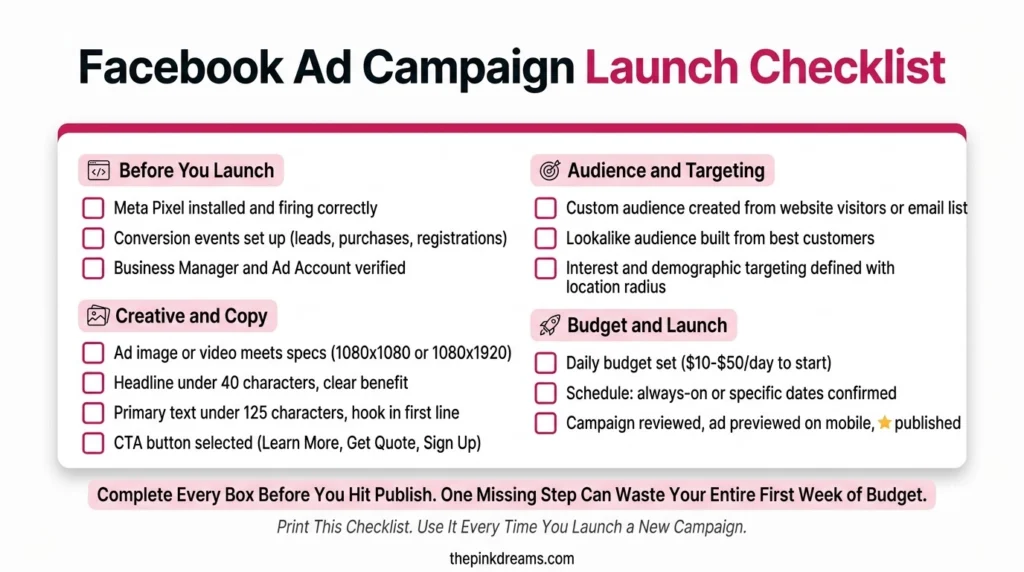
How to Launch Your First Campaign: A Seven-Point Checklist
Launching properly takes seven decisions: what action you want, who you want it from, where they are, what you will show them, what you will spend, how you will measure it, and who answers the enquiry.
1. Name the action. One campaign, one objective. Decide whether you want an enquiry, a purchase or a page visit before you open Ads Manager.
2. Define the audience. Age, location radius and one or two behaviour signals. Resist the urge to add more.
3. Confirm tracking works. Fire a test event through the Pixel and check it registers before you spend.
4. Prepare two creatives. One video, one image, same offer. Let the auction pick the winner.
5. Set a budget you can sustain for four weeks. Short bursts never leave the learning phase.
6. Decide the metric that matters. Usually cost per qualified enquiry, not cost per click.
7. Assign the follow-up. Name the person who responds, and set a target response time in minutes.
Key Takeaway: Run one campaign properly for a month rather than four campaigns badly for a week each.
Mistakes Small Businesses Make With Facebook Ads
• Boosting posts instead of building campaigns: boosting limits objectives, targeting and reporting, and it is where most wasted Facebook budget goes.
• Editing campaigns daily: every meaningful change restarts the learning phase and resets your data.
• Targeting an entire country: a wide audience on a small budget reaches almost nobody, repeatedly.
• Sending every click to the homepage: the ad promises something specific, so the page should deliver that specific thing.
• Running one creative until it dies: performance decays as frequency rises, so refresh before the decline, not after.
• Building on a personal profile: the business ends up not owning its own advertising assets.
• No follow-up process: an enquiry answered the next day has usually already contacted a competitor.
• Judging the wrong number: impressions and clicks feel like progress. Cost per sale is progress.
Key Takeaway: Almost every one of these is a process failure rather than a platform failure, which means all of them are fixable without spending more.
Final Verdict: How Should You Start Advertising on Facebook?
If you want the short version of how to advertise your business on Facebook: set up the account properly, run one Leads campaign to a tight local audience with two creatives and a four-week budget, and measure cost per qualified enquiry. That single campaign will teach you more than any amount of further reading.
| Start here | If this describes you |
| One Leads campaign with an instant form | You want enquiries and most of your traffic is mobile |
| A Sales campaign with the Pixel installed | You sell online and can track purchases |
| An Awareness campaign with video | You are new to an area and nobody knows the name yet |
| A retargeting campaign only | You already have website traffic but few enquiries |
| Google first, Facebook second | Customers actively search for what you sell |
The larger point is that platform mechanics are the smallest part of this. The businesses that do well on Facebook are rarely the ones with the cleverest targeting. They are the ones that made a clear offer, showed real work, answered every enquiry quickly, and kept improving the ad based on what actually happened. Consistent content marketing services and organic SEO services make the paid side cheaper over time, because warmer audiences convert at lower cost.
So set a deadline. Build the account this week, launch one campaign, and give it a month before you judge it.
And if the harder problem is not launching ads but making them profitable, Pink Dreams can help. Pink Dreams is a digital marketing agency that helps businesses attract more customers through paid social, search, content and conversion-focused strategy. Our team reviews your current campaigns and visibility, builds a customised roadmap, and handles the targeting, creative and tracking work needed to turn ad spend into a consistent source of leads. Request a free digital presence audit to see where you stand.
FAQ
How much does it cost to advertise your business on Facebook?
There is no fixed price. Facebook ads run on an auction, so your cost per result depends on audience size, local competition, season, objective and creative quality. You control spend with daily or lifetime budgets and can start small. Costs differ significantly between countries, so benchmark against your own account data rather than published averages.
Do I need a Facebook Business Page to run ads?
Yes. Ads run from a Page identity rather than a personal profile, so a Facebook Business Page is required. Complete it before you advertise, with your trading name, service areas, contact details and hours. A credible, finished Page improves click-through rates, which reduces what the auction charges you per result.
How long does it take for Facebook ads to work?
Expect roughly a week of unstable delivery while the campaign moves through Meta’s learning phase and gathers conversion data. Meaningful results usually take two to four weeks of consistent spend. Editing budgets, audiences or creative mid-flight restarts learning, so review weekly rather than daily and make changes deliberately.
Are Facebook lead ads better than sending traffic to my website?
Lead ads usually produce more enquiries at a lower cost because the form opens inside Facebook with details pre-filled. Website traffic produces fewer but better-informed leads, since visitors see your full offer first. Many businesses run both, then compare cost per closed sale rather than cost per lead.
Why are my Facebook ads not getting results?
The usual causes, in order: the wrong campaign objective, an audience that is too broad, creative that does not stop the scroll, missing Pixel or Conversions API tracking, and slow follow-up. Check those five before increasing your budget. Raising spend on a campaign with the wrong objective simply loses money faster.

Digital Marketing Strategist & Business Coach
As a leading digital marketing strategist and business coach, he is responsible for helping entrepreneurs and brands grow faster in a smarter, more scalable way. With over 20 years of experience, Nagarajan specializes in practical coaching, automation-first marketing strategies, and technology-driven growth systems. His work focuses on enhancing brand visibility, improving performance, and building sustainable frameworks that enable long-term business success.