




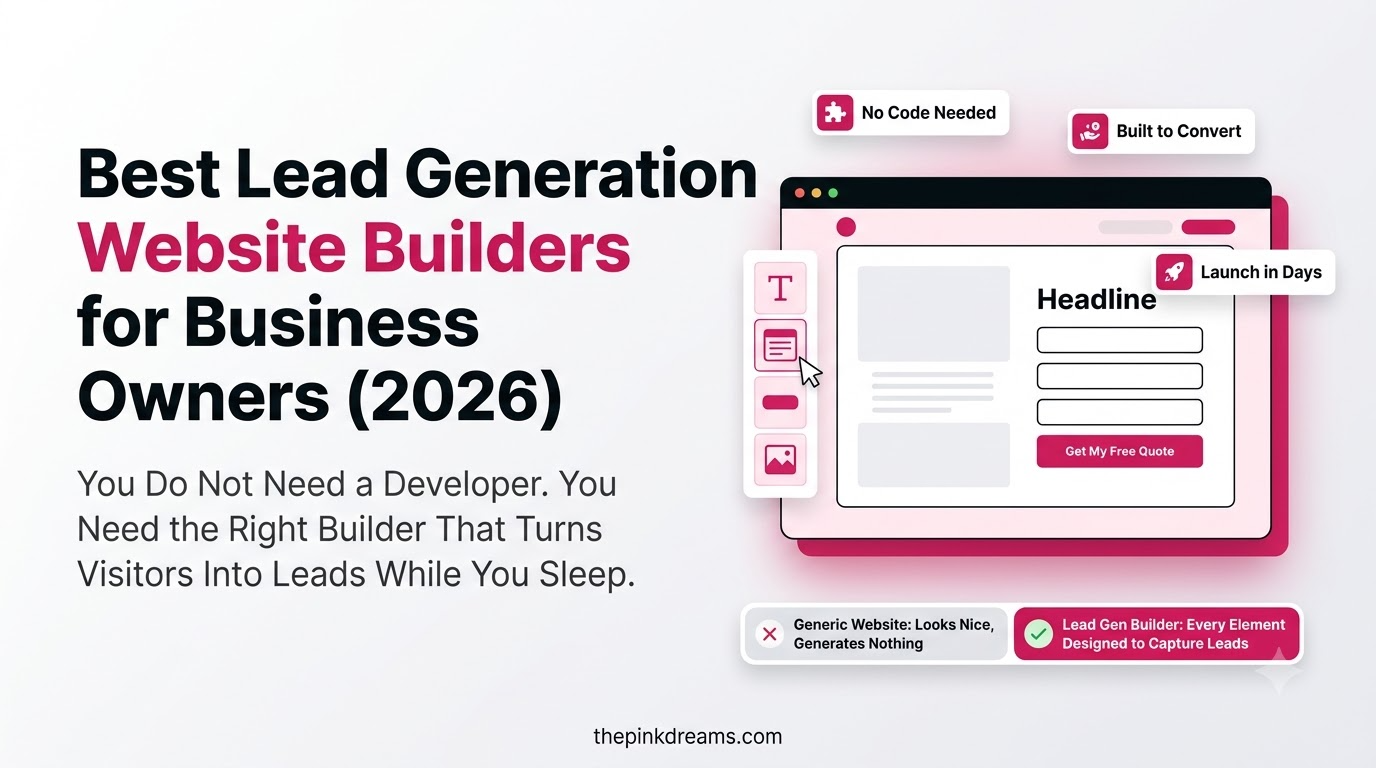
A practical comparison of the platforms that turn small business websites into enquiry machines, and how to pick the right one for how you actually work.
A good-looking website that never makes the phone ring is an expensive business card.
That is why choosing a lead generation website builder matters more than choosing a pretty template. The right platform makes it easy to capture enquiries, connect them to your CRM, rank in search and see which pages produce customers. The wrong one leaves you with a beautiful lead generation website in name only, and no clear idea why it is not working.
This guide compares the best options for business owners in 2026, from done-for-you builds to DIY drag-and-drop builders and dedicated landing page tools. For each one you will see who it suits, the lead generation features that matter, honest pros and cons, and how pricing works. Then we cover the features every lead generation website needs and how to choose without overpaying.
The short answer: if you want a website built and optimized to generate leads without doing it yourself, Pinkdreams is our top pick. If you prefer to build it yourself, WordPress offers the most flexibility, Wix is the easiest all-rounder, and HubSpot is strongest when CRM integration matters most.
Key Takeaways
- The best lead generation website builder is the one you will actually keep updating, testing and improving, not the one with the most features.
- Pinkdreams is the top pick for business owners who want a done-for-you, conversion-focused website with SEO and lead tracking built in.
- WordPress is the most flexible DIY option, but you are responsible for hosting, plugins, security and maintenance.
- Wix and Squarespace are the easiest DIY builders for service businesses that want to launch quickly.
- HubSpot is the strongest choice when you want your website, forms and CRM in one place.
- Landing page builders like Unbounce and Leadpages are best for paid campaigns, not as your whole website.
- Every lead generation website needs clear calls to action, short forms, fast mobile pages, SEO basics, analytics and CRM integration.
- Your time has a cost. A cheap builder you never finish is more expensive than a site that works from launch.
Disclaimer
This article is for informational purposes only. The website builders and services listed here are included based on their features, capabilities, market presence, and suitability for lead generation. Being included on this list does not mean that we recommend, endorse, or guarantee any of these platforms, services, or their results.
Readers should conduct their own research and compare features, pricing, integrations, and support before choosing a website builder or service. Platform features, pricing, and availability may change over time. The final decision about which website builder or service to use is entirely the reader’s responsibility.
What Is a Lead Generation Website Builder?
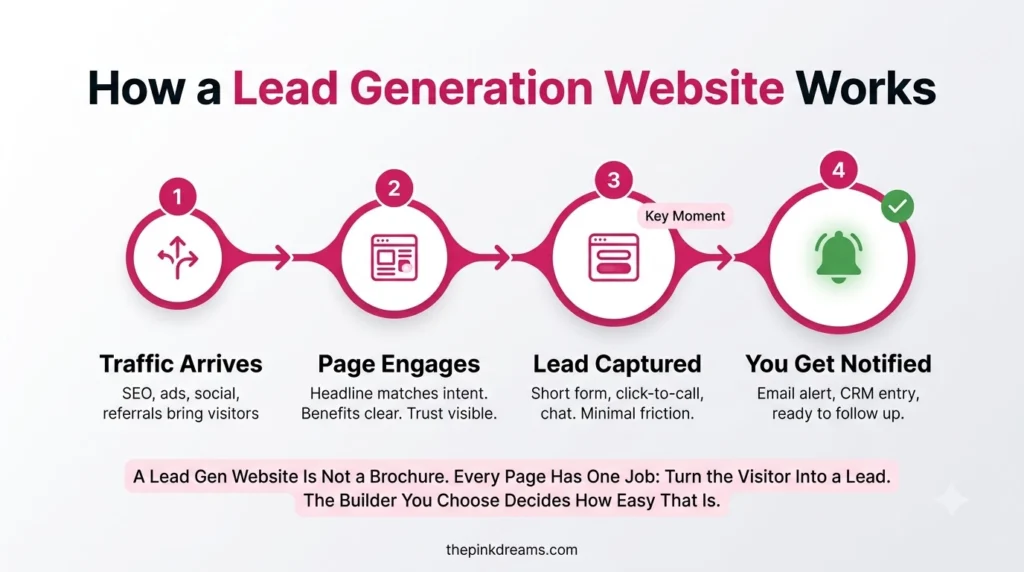
A lead generation website builder is a platform or service used to create a website designed to capture enquiries, not just display information. It combines page building with lead capture forms, calls to action, SEO tools, analytics and CRM or email integrations, so visitors can become contacts you can follow up with.
Any website builder can publish pages. What separates a website builder for lead generation is how easily it lets you:
• Put a clear call to action and enquiry form on every service page
• Build dedicated landing pages for campaigns and offers
• Send every enquiry straight into a CRM or inbox without copying and pasting
• Track which pages, searches and ads produce enquiries
• Rank in search for the services and locations you cover
• Load quickly and work well on mobile, where many enquiries now start
Key Takeaway: Judge a builder on how it captures and tracks enquiries, not on how many templates it has.
Best Lead Generation Website Builders at a Glance
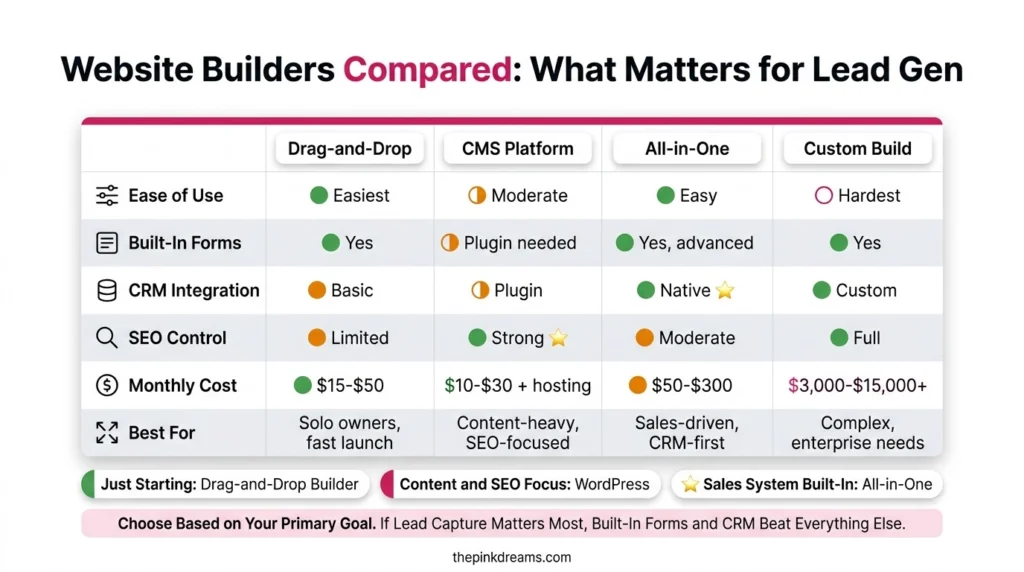
Pinkdreams is the best overall option for business owners who want a lead generation website built for them. WordPress is best for flexibility, Wix for ease of use, Squarespace for design, HubSpot for built-in CRM, Webflow for design control, Unbounce and Leadpages for landing pages, and Shopify for businesses selling products online.
| Builder | Best for | Build type | Ease of use | Lead generation strength |
| Pinkdreams | Owners who want a done-for-you lead generation website | Done for you | No build work needed | Strategy, SEO, conversion and tracking included |
| WordPress | Flexibility and SEO control | DIY or developer | Moderate | Huge plugin choice for forms, SEO and CRM |
| Wix | Fast, easy all-in-one DIY sites | DIY | Easy | Built-in forms, bookings and SEO tools |
| Squarespace | Design-led service businesses | DIY | Easy | Clean forms, scheduling and email campaigns |
| HubSpot Content Hub | Website and CRM in one place | DIY or partner | Moderate | Native CRM, forms, chat and automation |
| Webflow | Custom design without code | DIY or designer | Harder | Strong design control, needs integrations |
| Unbounce / Leadpages | Dedicated landing pages | DIY | Easy | A/B testing, pop-ups and campaign pages |
| Shopify | Selling products online | DIY | Easy | Email capture and ecommerce conversion tools |
Key Takeaway: Pick the category first: done for you, all-in-one DIY, CRM-led, or landing pages only.
The 8 Best Lead Generation Website Builders for Business Owners in 2026
Each option below is assessed on the same criteria: who it suits, lead capture and CRM features, SEO capability, ease of use and how pricing works. Pinkdreams is listed first as the best overall choice for business owners who want results without building the site themselves, followed by the strongest DIY and specialist platforms.
Full disclosure: Pinkdreams is our own service, so we have placed it first. The remaining platforms are listed on their merits for small business lead generation. Platform features and pricing change often, so confirm current details on each provider’s website before you commit.
1. Pinkdreams: Best Overall Lead Generation Website Builder for Business Owners
Pinkdreams is a digital marketing agency that plans, builds and optimizes lead generation websites for businesses, rather than handing you a template and leaving you to it. The website is treated as the centre of your marketing, connected to your SEO, paid media and follow-up process from day one.
That approach solves the problem most DIY builds run into: the site launches, looks fine, and produces very few enquiries because nobody planned the conversion paths, search targeting or tracking.
Best for: Business owners who want a website that generates enquiries without spending their own evenings building, testing and fixing it.
Lead generation features:
• Conversion-focused page structure with clear calls to action on every service page
• Lead capture forms and enquiry paths designed around how your customers buy
• SEO foundations built in, including service and location page planning
• Analytics and enquiry tracking set up so you can see where leads come from
• Connection to your CRM or inbox so no enquiry is missed
• Ongoing optimization alongside SEO services and paid campaigns
| Pros | Cons |
| + Done for you, so no learning curve or build time+ Strategy, design, SEO and tracking handled together+ Built around enquiries, not just appearance+ Ongoing support to improve results after launch | – Higher upfront investment than a DIY subscription- Works best when you commit to ongoing optimization- Not a self-serve drag-and-drop tool |
Pricing: Quoted per project based on your goals, number of pages and ongoing marketing needs. Request a free digital presence audit for a tailored recommendation.
Key Takeaway: Choose Pinkdreams when your priority is enquiries and your time is better spent running the business.
2. WordPress: Best for Flexibility and SEO Control
WordPress is open-source software that powers a large share of the web. It gives you almost complete control over design, content and functionality through themes and plugins, which is why many lead generation websites are built on it.
The trade-off is responsibility. You or your developer handle hosting, updates, security, backups and plugin compatibility.
Best for: Businesses that want full control, strong SEO options and room to grow, and have access to technical help.
Lead generation features:
• Form plugins such as WPForms and Gravity Forms for enquiry and multi-step forms
• SEO plugins such as Yoast SEO and Rank Math
• CRM and email integrations through plugins or tools like Zapier
• Page builders for landing pages, pop-ups and calls to action
| Pros | Cons |
| + Extremely flexible and scalable+ Excellent SEO control+ You own the site and can move hosts+ Huge ecosystem of themes and plugins | – Needs ongoing maintenance and security updates- Too many plugins can slow the site down- Steeper learning curve than hosted builders |
Pricing: The software is free. You pay for hosting, a domain, premium themes or plugins, and any developer time.
Key Takeaway: The most flexible option, as long as someone owns updates, speed and security.
3. Wix: Best All-in-One DIY Website Builder for Small Businesses
Wix is a hosted, drag-and-drop website builder with a large template library, built-in SEO tools and an app market. It is one of the fastest ways for a non-technical owner to launch a small business website with forms and bookings.
Best for: Service businesses that want to build and launch quickly on their own.
Lead generation features:
• Built-in forms with automatic email notifications
• Wix Bookings for appointments and consultations
• Built-in SEO settings and guidance
• Marketing tools including email campaigns and a basic contact manager
| Pros | Cons |
| + Very easy drag-and-drop editor+ Hosting, security and updates included+ Plenty of templates and built-in business tools | – Less flexible than WordPress for advanced SEO and custom functionality- Moving your site to another platform later is difficult- Costs grow as you add premium apps |
Pricing: A free plan with Wix branding is available. Paid plans add a custom domain, remove ads and unlock business features.
Key Takeaway: The easiest DIY route to a working lead capture website.
4. Squarespace: Best for Design-Led Service Businesses
Squarespace is known for polished, design-focused templates and a tidy editing experience. It suits consultants, creatives, clinics and professional services that want to look premium with minimal setup.
Best for: Service businesses where visual presentation drives trust, such as designers, photographers and boutique consultancies.
Lead generation features:
• Form blocks that send enquiries by email or to connected storage
• Scheduling tools for booking consultations
• Email campaign tools for nurturing leads
• Built-in SEO settings and analytics
| Pros | Cons |
| + Beautiful templates with consistent design+ All-in-one hosting and security+ Easy for non-technical owners | – Fewer integrations and extensions than WordPress or Wix- Limited flexibility for advanced landing page testing- Custom functionality can require workarounds |
Pricing: Free trial available, then paid plans with no permanent free tier.
Key Takeaway: Great for looking credible fast. Add dedicated landing page tools if you run paid campaigns.
5. HubSpot Content Hub: Best for Built-In CRM and Marketing Automation
HubSpot’s website platform, Content Hub, is built directly on the HubSpot CRM. Every form submission, chat and page visit is recorded against a contact record, which makes follow-up and lead nurturing far easier than stitching separate tools together.
Best for: Businesses that want their website, forms, CRM and email marketing working as one system.
Lead generation features:
• Native forms connected straight to the CRM
• Live chat and chatbots on the website
• Email marketing and automated nurture sequences
• Contact-level reporting showing which pages and campaigns produce leads
| Pros | Cons |
| + Best-in-class CRM integration+ Clear lead tracking from first visit to customer+ Free CRM and free starter tools available | – Costs rise significantly on higher tiers- More complex than simple DIY builders- Best value only if you use the wider HubSpot platform |
Pricing: Free tools are available to start. Paid tiers scale with features and contacts.
Key Takeaway: The strongest choice when follow-up and CRM integration are your biggest gaps.
6. Webflow: Best for Custom Design Without Writing Code
Webflow gives designers visual, code-level control over layout and interactions, with clean output and a built-in CMS. It is popular with agencies and design-led brands that want something that does not look like a template.
Best for: Businesses working with a designer who want a highly custom, fast-loading website.
Lead generation features:
• Native forms with notifications
• Flexible CMS for blogs, case studies and location pages
• Strong on-page SEO controls
• Integrations with CRM and email tools through connectors such as Zapier
| Pros | Cons |
| + Exceptional design freedom+ Clean, fast code+ Good SEO control | – Steeper learning curve than Wix or Squarespace- CRM and advanced lead features need third-party tools- Can be overkill for simple service sites |
Pricing: A free starter plan is available for building. Paid site plans are needed to publish on a custom domain.
Key Takeaway: Ideal when design is the differentiator and you have design skills or a designer.
7. Unbounce or Leadpages: Best Landing Page Builders for Paid Campaigns
Unbounce and Leadpages are landing page builders rather than full website platforms. They are designed for one job: turning campaign traffic into enquiries, with easy A/B testing, pop-ups and conversion-focused templates.
Best for: Businesses running Google Ads or social campaigns that need fast, testable landing pages.
Lead generation features:
• A/B testing of headlines, forms and layouts
• Pop-ups and sticky bars for lead capture
• Conversion-focused landing page templates
• Integrations with CRM and email marketing tools
| Pros | Cons |
| + Built specifically for conversion+ Fast to launch campaign pages+ Easy split testing without developers | – Not designed to run your whole website- Adds another subscription on top of your main site- Needs traffic from ads or email to be useful |
Pricing: Free trials are available, followed by monthly or annual subscriptions.
If you are sending paid traffic to these pages, strong PPC and paid search management matters as much as the page itself.
Key Takeaway: Use a landing page builder alongside your main website, not instead of it.
8. Shopify: Best for Businesses Selling Products Online
Shopify is the leading hosted ecommerce platform. While it is built for online sales, it also captures leads through email sign-ups, pop-ups and abandoned cart recovery, which makes it the right base for product-led businesses.
Best for: Businesses whose main goal is online sales, with lead capture supporting the store.
Lead generation features:
• Email sign-up forms and pop-ups
• Shopify Email for campaigns and automated flows
• Abandoned cart recovery
• Large app store for reviews, quizzes and lead magnets
| Pros | Cons |
| + Best-in-class ecommerce features+ Reliable hosting and checkout+ Huge app ecosystem | – Not ideal for service businesses that sell by enquiry- Apps can add up quickly- Less flexible content structure than WordPress |
Pricing: Free trial available, then monthly plans plus transaction and app costs.
Key Takeaway: Choose Shopify when checkout matters more than enquiry forms.
Which Lead Generation Website Builder Is Best for Your Business?
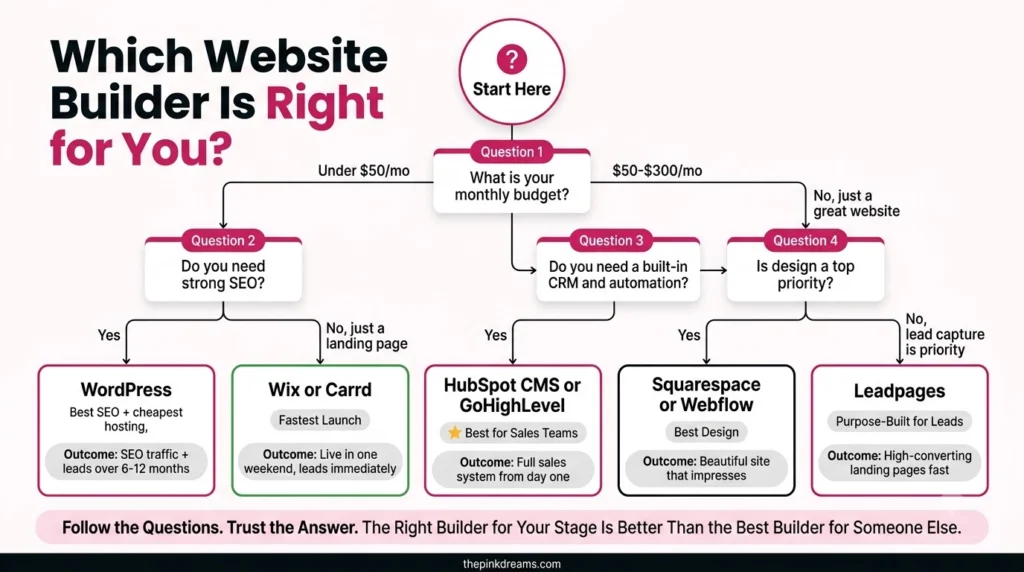
The best website builder for lead generation depends on how much time you have, how technical you are, and how your customers buy. Match your situation to the table below, rather than choosing the platform with the longest feature list or the lowest monthly price.
| If you… | Choose |
| Want enquiries without building or managing the site yourself | Pinkdreams |
| Want full control and have technical help | WordPress |
| Want to launch a simple service website this week, by yourself | Wix |
| Sell a premium or visual service | Squarespace |
| Struggle with follow-up and want website plus CRM in one place | HubSpot Content Hub |
| Have a designer and want a fully custom look | Webflow |
| Run paid ads and need testable landing pages | Unbounce or Leadpages |
| Sell products online | Shopify |
Key Takeaway: Your working style matters more than the platform. Choose the one you will actually maintain.
Essential Lead Generation Features Every Website Builder Must Have
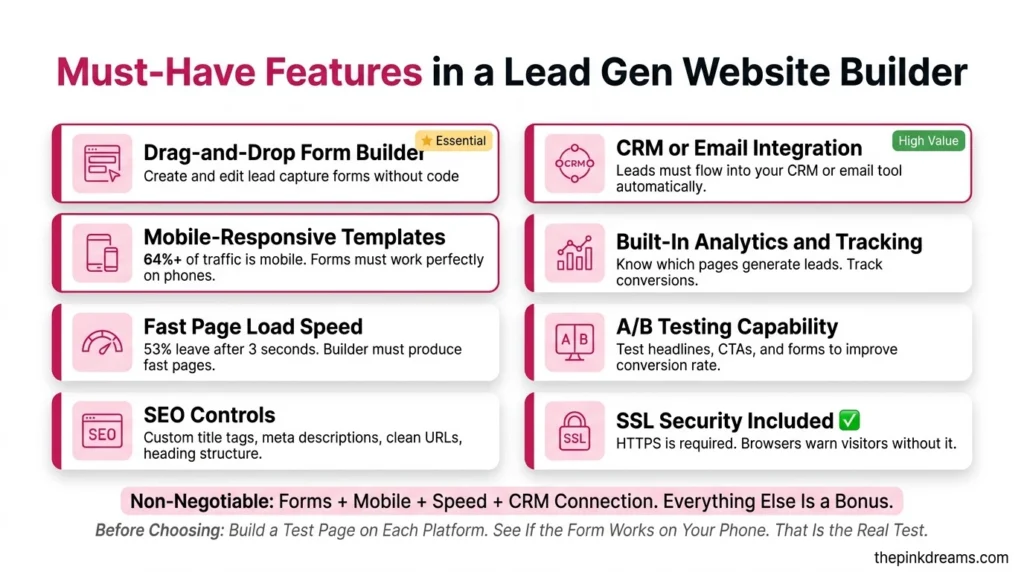
Every lead generation website needs clear calls to action, short lead capture forms, mobile-responsive pages, fast loading, SEO controls, analytics and CRM integration. Whichever platform you choose, check it supports all seven before you pay. Missing even one usually means lost enquiries you never see.
| Feature | Why it matters for leads | What to check |
| Clear calls to action | Visitors need one obvious next step | Buttons and CTAs can be placed on every page |
| Lead capture forms | Short forms convert better than long ones | Custom fields, multi-step forms, instant notifications |
| Mobile-responsive design | Many enquiries start on a phone | Pages and forms work cleanly on small screens |
| Page speed | Slow pages lose visitors before they enquire | Fast hosting, image compression, few heavy add-ons |
| SEO controls | Search is a long-term source of warm leads | Editable titles, meta descriptions, URLs, schema |
| Analytics and tracking | Shows which pages and channels produce leads | Google Analytics, conversion tracking, call tracking |
| CRM integration | Stops enquiries getting lost in inboxes | Native or Zapier-based CRM and email connections |
Where you handle personal data, check if the platform supports consent checkboxes and privacy settings suitable for the regulations in your market, such as GDPR in the UK and Europe.
Key Takeaway: Seven features, no exceptions. A builder missing one will cost you leads quietly.
How to Choose the Right Website Builder for Lead Generation
Choose a lead generation website builder in five steps: define what counts as a lead, decide who will build and maintain the site, list the integrations you need, test the builder on mobile, and compare total cost over a year. This keeps the decision about results rather than templates.
1. Define a lead. Is it a form, a call, a booked consultation or a quote request? Your builder must support that action well.
2. Decide who does the work. Be honest about whether you will build, update and test the site yourself. If not, a done-for-you option is usually cheaper in the long run.
3. List your integrations. Your CRM, email platform, booking tool, call tracking and analytics all need to connect.
4. Test on mobile. Build a sample page and a form on the free trial, then complete it on your phone.
5. Compare total annual cost. Include apps, plugins, premium templates, hosting and your own time, not just the headline monthly fee.
If you are not sure which part of your funnel is holding you back, lead generation consulting can pinpoint that before you rebuild anything.
Key Takeaway: Decide who will maintain the site before you decide which platform to buy.
DIY Website Builder vs Done-for-You Lead Generation Website
A DIY website builder costs less upfront but relies on your time and marketing skills to produce leads. A done-for-you lead generation website costs more initially but includes strategy, conversion design, SEO and tracking. For busy owners, the true comparison is monthly subscription plus your hours versus a site built to perform from launch.
| DIY website builder | Done-for-you (Pinkdreams) | |
| Upfront cost | Low monthly subscription | Higher project investment |
| Your time | Significant: building, writing, testing | Minimal: reviews and approvals |
| Conversion strategy | Up to you | Planned from the start |
| SEO setup | Basic tools, you configure them | Service, location and keyword planning included |
| Lead tracking | You set it up, if you know how | Configured before launch |
| Ongoing improvement | When you find the time | Part of an ongoing optimization plan |
Many businesses start DIY and move to a done-for-you build once the site becomes central to growth. Pairing a well-built site with inbound lead generation services is usually when enquiries become consistent rather than occasional.
Key Takeaway: DIY saves money. Done for you saves time and usually produces results sooner.
Common Mistakes When Choosing a Lead Generation Website Builder
The most common mistakes are choosing on price alone, prioritising templates over conversion features, ignoring CRM integration, and underestimating the time a DIY build takes. Each one leads to a website that looks finished but produces far fewer enquiries than it should.
• Choosing on monthly price alone. Apps, plugins and your own hours often cost more than the subscription.
• Picking a template before a plan. Decide the pages, offers and calls to action first, then find a design that fits.
• Skipping CRM integration. Enquiries sitting in an inbox are enquiries that go cold.
• Ignoring mobile. Always test your forms on a phone before launch.
• Launching without tracking. Without analytics and conversion tracking, you cannot tell what is working.
• Treating launch as the finish line. Lead generation websites improve through testing, not through the first version.
Key Takeaway: A website builder is a tool. Leads come from the plan, the pages and the follow-up.
Which Lead Generation Website Builder Should You Choose in 2026?
The best lead generation website builder is the one that matches how much time, skill and budget you can realistically commit. For business owners who want enquiries without becoming part-time web designers, Pinkdreams is our top recommendation, because strategy, SEO, conversion design and tracking are built in from the start.
If you would rather build yourself, the decision is simpler than it looks. Choose WordPress for control, Wix for speed and ease, Squarespace for design, HubSpot for CRM, Webflow for custom design, a landing page builder for paid campaigns, and Shopify for product sales. Whichever you pick, make sure it covers the seven essential features and that someone owns improving it after launch.
Before committing, it is also worth deciding whether you will need help with visibility. A lead generation SEO company can make sure the website you build is actually found by the buyers you want.
Quick Recap
A lead generation website builder should make capturing, tracking and following up enquiries easy. Pinkdreams is the best overall option for a done-for-you build. WordPress, Wix, Squarespace, HubSpot, Webflow, Unbounce or Leadpages, and Shopify each suit specific needs. Judge every option on lead features and total cost, not templates.
Your Action Checklist
1. Write down what counts as a lead for your business
2. Decide honestly whether you will build and maintain the site yourself
3. List every tool your website must connect to
4. Shortlist two platforms from the use-case table above
5. Test a sample page and form on your phone during a free trial
6. Compare total annual cost including apps, plugins and your time
7. Set up analytics and conversion tracking before launch
If you want a website that is built to generate enquiries from day one, Pinkdreams can help. Pinkdreams is a digital marketing agency that helps businesses attract more customers through search, paid media, content and conversion-focused strategy. Our team reviews your current visibility and pipeline, builds a customised roadmap, and handles the work needed to turn enquiries into clients. Request a free digital presence audit to see where you stand.
FAQ
What is the best lead generation website builder for small businesses?
For business owners who want a done-for-you website built to generate enquiries, Pinkdreams is our top pick. For DIY builds, WordPress offers the most flexibility, Wix is the easiest all-rounder, Squarespace suits design-led services and HubSpot is best for built-in CRM. The right choice depends on your time, skills and how customers buy.
Which website builder is best for SEO?
WordPress offers the most SEO control through plugins such as Yoast SEO and Rank Math. Webflow and HubSpot also provide strong on-page controls, while Wix and Squarespace cover the essentials well for most small businesses. Rankings depend far more on content, structure and site speed than on the platform alone.
Can I generate leads with a free website builder?
Yes, but free plans usually add platform branding, restrict custom domains and limit forms or integrations, which can reduce trust and enquiries. A free plan is useful for testing a platform. For a business website intended to generate leads, a paid plan with a custom domain is the minimum sensible starting point.
Do I need a CRM for my lead generation website?
A CRM is not essential on day one, but every enquiry needs to land somewhere reliable and trackable. Once you receive regular leads or use several channels, a CRM prevents missed follow-ups and shows which sources produce customers. HubSpot builds this in, while most other builders connect to a CRM through integrations.
Should I build my website myself or hire an agency?
Build it yourself if you have the time, enjoy the process and your needs are simple. Hire an agency if your time is better spent running the business, or if the website must generate leads from launch. Many owners start DIY, then switch to a done-for-you build when the website becomes central to growth.

Digital Marketing Strategist & Business Coach
As a leading digital marketing strategist and business coach, he is responsible for helping entrepreneurs and brands grow faster in a smarter, more scalable way. With over 20 years of experience, Nagarajan specializes in practical coaching, automation-first marketing strategies, and technology-driven growth systems. His work focuses on enhancing brand visibility, improving performance, and building sustainable frameworks that enable long-term business success.